M09 Computing Ideal Strength
Manual 09 for MD++
Computing Ideal Strength
Keonwook Kang and Wei Cai
The ideal strength of a material is the maximum stress that it can sustain and is an upper bound to the critical stress for crack and dislocation nucleation in the material. When the applied stress exceeds the ideal strength, the crystal structure will collapse even at zero temperature. The mode of failure depends on the type of applied stress. When the tensile stress exceeds the ideal tensile strength, the crystal is unstable against cleavage fracture. When the shear stress exceeds the ideal shear strength, the crysal is unstable against slip on crystallographic planes. Because a real crystal is not perfect but contains defects (such as surfaces, grain boundaries, dislocations, vacancies), its strength is lower than the ideal strength. When the defect density is made sufficiently small (such as in whiskers), the strength of a real crystal can approach the ideal strength. The ideal strength is also called the theoretical strength.
There are two alternative definitions of the ideal strength depending on the way that the deformation is imposed on the perfect crystal structure. In the first definition, the deformation strain can be applied uniformly to the simulation cell (usually under periodic boundary conditions) resulting in an affine deformation of the entire crystal[1]. In the second definition, the deformation strain can be localized between two crystallographic planes[2]. The ideal strength values obtained from these two approaches are somewhat different but are also expected to co-relate with each other. In this manual, we describe how to compute the ideal strength according to the second definition, using diamond-cubic structure of Si as an example.
Ideal Tensile Strength
Suppose we want to compute the ideal tensile strength of Si along the [1 1 0] direction, i.e., . First, we create a simulation cell under periodic boundary condition (PBC) with the three periodicity vectors , and . The coordinate system is defined such that , and are aligned along Failed to parse (SVG (MathML can be enabled via browser plugin): Invalid response ("Math extension cannot connect to Restbase.") from server "https://wikimedia.org/api/rest_v1/":): {\displaystyle x} , Failed to parse (SVG (MathML can be enabled via browser plugin): Invalid response ("Math extension cannot connect to Restbase.") from server "https://wikimedia.org/api/rest_v1/":): {\displaystyle y} and Failed to parse (SVG (MathML can be enabled via browser plugin): Invalid response ("Math extension cannot connect to Restbase.") from server "https://wikimedia.org/api/rest_v1/":): {\displaystyle z} directions, respectively. The crystal just created is surrounded by its own images in all three directions.
![{\displaystyle \sigma _{[110]}^{\mathrm {th} }}](https://wikimedia.org/api/rest_v1/media/math/render/svg/c0f75b0edd2d439abde70faadfaf47c6ffffca13)
![{\displaystyle \mathbf {c} _{1}=N_{x}[110]}](https://wikimedia.org/api/rest_v1/media/math/render/svg/fba118bbcc340e67c33f8ffc8dfc4826a4b8f581)
![{\displaystyle \mathbf {c} _{2}=N_{y}[{\bar {1}}10]}](https://wikimedia.org/api/rest_v1/media/math/render/svg/b435a061d19dc0fe0f28450cd5fa59df61447260)
![{\displaystyle \mathbf {c} _{3}=N_{z}[001]}](https://wikimedia.org/api/rest_v1/media/math/render/svg/a44758ea1bec16598a3cee23a5054cead46d07fd)


Next, we change the length of the repeat vector Failed to parse (SVG (MathML can be enabled via browser plugin): Invalid response ("Math extension cannot connect to Restbase.") from server "https://wikimedia.org/api/rest_v1/":): {\displaystyle \mathbf{c}_1} while keeping the position of all atoms in the simulation cell fixed. Let Failed to parse (SVG (MathML can be enabled via browser plugin): Invalid response ("Math extension cannot connect to Restbase.") from server "https://wikimedia.org/api/rest_v1/":): {\displaystyle \mathbf{c}_1^0} be the original value of the repeat vector along the Failed to parse (SVG (MathML can be enabled via browser plugin): Invalid response ("Math extension cannot connect to Restbase.") from server "https://wikimedia.org/api/rest_v1/":): {\displaystyle x} direction and Failed to parse (SVG (MathML can be enabled via browser plugin): Invalid response ("Math extension cannot connect to Restbase.") from server "https://wikimedia.org/api/rest_v1/":): {\displaystyle L_x^0 = |\mathbf{c}_1^0|} . Suppose we assign the new repeat vector to be
| Failed to parse (SVG (MathML can be enabled via browser plugin): Invalid response ("Math extension cannot connect to Restbase.") from server "https://wikimedia.org/api/rest_v1/":): {\displaystyle \mathbf{c}_1 = \left( 1 + \frac{d}{L_x^0}\right) \mathbf{c}_1^0 } . |
This will create a gap of width Failed to parse (SVG (MathML can be enabled via browser plugin): Invalid response ("Math extension cannot connect to Restbase.") from server "https://wikimedia.org/api/rest_v1/":): {\displaystyle d} between the crystal in the simulation cell (primary cell) with its images in the Failed to parse (SVG (MathML can be enabled via browser plugin): Invalid response ("Math extension cannot connect to Restbase.") from server "https://wikimedia.org/api/rest_v1/":): {\displaystyle x} direction, as shown in Fig. 1(a). For each value of Failed to parse (SVG (MathML can be enabled via browser plugin): Invalid response ("Math extension cannot connect to Restbase.") from server "https://wikimedia.org/api/rest_v1/":): {\displaystyle d} , we compute the potential energy of the crystal (without relaxing the positions of the atoms). The excess energy with respect to the case of Failed to parse (SVG (MathML can be enabled via browser plugin): Invalid response ("Math extension cannot connect to Restbase.") from server "https://wikimedia.org/api/rest_v1/":): {\displaystyle d=0} , dividied by the cross section area of the simulation cell perpendicular to the Failed to parse (SVG (MathML can be enabled via browser plugin): Invalid response ("Math extension cannot connect to Restbase.") from server "https://wikimedia.org/api/rest_v1/":): {\displaystyle x} direction, is defined as function of Failed to parse (SVG (MathML can be enabled via browser plugin): Invalid response ("Math extension cannot connect to Restbase.") from server "https://wikimedia.org/api/rest_v1/":): {\displaystyle d}
| Failed to parse (SVG (MathML can be enabled via browser plugin): Invalid response ("Math extension cannot connect to Restbase.") from server "https://wikimedia.org/api/rest_v1/":): {\displaystyle \gamma = \gamma ( d ) } . |
and is plotted in Fig. 2(a).
In MD++, the transformation of the simulation cell as described above can be performed conveniently using the command changeH_keepR. Failed to parse (SVG (MathML can be enabled via browser plugin): Invalid response ("Math extension cannot connect to Restbase.") from server "https://wikimedia.org/api/rest_v1/":): {\displaystyle \mathbf{H}} is a 3 by 3 matrix whose three columns correspond to the coordinates of the three repeat vectors, i.e. Failed to parse (SVG (MathML can be enabled via browser plugin): Invalid response ("Math extension cannot connect to Restbase.") from server "https://wikimedia.org/api/rest_v1/":): {\displaystyle \mathbf{H} = [\mathbf{c}_1 | \mathbf{c}_2 | \mathbf{c}_3]} . The syntax for this command is
input = [ i j frac ] changeH_keepR
This will lead to the following transformation of the repeat vectors
| Failed to parse (SVG (MathML can be enabled via browser plugin): Invalid response ("Math extension cannot connect to Restbase.") from server "https://wikimedia.org/api/rest_v1/":): {\displaystyle \mathbf{c}_i := \mathbf{c}_i + frac \cdot \mathbf{c}_j } . |
Since we want to change the length of Failed to parse (SVG (MathML can be enabled via browser plugin): Invalid response ("Math extension cannot connect to Restbase.") from server "https://wikimedia.org/api/rest_v1/":): {\displaystyle \mathbf{c}_1} without changing its direction, both i and j should be 1 for computing the ideal tensile strength along Failed to parse (SVG (MathML can be enabled via browser plugin): Invalid response ("Math extension cannot connect to Restbase.") from server "https://wikimedia.org/api/rest_v1/":): {\displaystyle x} direction. (i and j will be different when computing the ideal shear strength as described in the next section.) A related command changeH_keepS performs identical transformations to the repeat vectors, but the scaled coordinates, instead of the real coordinates of the atoms are kept fixed. This will lead to an affine transformation of the simulation cell and is related to the first definition of the ideal strength as described above.
After the changeH_keepR, the potential energy is computed by the command eval. However, before computing the potential energy, we need to refresh the neighbor list. MD++ uses the Verlet list algorithm, in which the neighbor list is automatically refreshed whenever any atom is displaced by more than half the skin of the Verlet list since the last time the neighbor list is constructed. However, since here the atom positions do not change when we change the repeat vectors, the neighbor list will not be refreshed automatically. We can force the neighbor list to refresh by calling clearR0 right after the changeH_keepR command.
The MD++ script for this calculation is attached at the end of this manual. A few more commands are used there to facilitate the calculation. The saveH command saves the current value of the Failed to parse (SVG (MathML can be enabled via browser plugin): Invalid response ("Math extension cannot connect to Restbase.") from server "https://wikimedia.org/api/rest_v1/":): {\displaystyle \mathbf{H}} matrix to Failed to parse (SVG (MathML can be enabled via browser plugin): Invalid response ("Math extension cannot connect to Restbase.") from server "https://wikimedia.org/api/rest_v1/":): {\displaystyle \mathbf{H}_0} . The restoreH command copies Failed to parse (SVG (MathML can be enabled via browser plugin): Invalid response ("Math extension cannot connect to Restbase.") from server "https://wikimedia.org/api/rest_v1/":): {\displaystyle \mathbf{H}_0} back to Failed to parse (SVG (MathML can be enabled via browser plugin): Invalid response ("Math extension cannot connect to Restbase.") from server "https://wikimedia.org/api/rest_v1/":): {\displaystyle \mathbf{H}} . This commands are used to make the matrix Failed to parse (SVG (MathML can be enabled via browser plugin): Invalid response ("Math extension cannot connect to Restbase.") from server "https://wikimedia.org/api/rest_v1/":): {\displaystyle \mathbf{H}} is always restored to the original value whenever the changeH_keepR command is called. The RHtoS command is always called before eval which converts the real coordinates Failed to parse (SVG (MathML can be enabled via browser plugin): Invalid response ("Math extension cannot connect to Restbase.") from server "https://wikimedia.org/api/rest_v1/":): {\displaystyle \mathbf{r}_i} of the atoms to the scaled coordinates Failed to parse (SVG (MathML can be enabled via browser plugin): Invalid response ("Math extension cannot connect to Restbase.") from server "https://wikimedia.org/api/rest_v1/":): {\displaystyle \mathbf{s}_i} , Failed to parse (SVG (MathML can be enabled via browser plugin): Invalid response ("Math extension cannot connect to Restbase.") from server "https://wikimedia.org/api/rest_v1/":): {\displaystyle \mathbf{s}_i = \mathbf{H}^{-1} \mathbf{r}_i} . This is needed because the calculation of potential energy in MD++ is based on the scaled coordinates.
- Fig.1
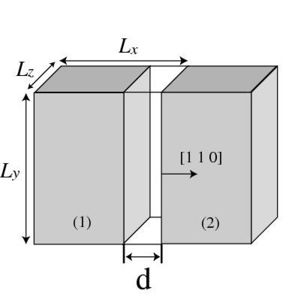
(a) Creating a gap between the primary and image crystals on a (1 1 0) plane by changing the length of repeat vector Failed to parse (SVG (MathML can be enabled via browser plugin): Invalid response ("Math extension cannot connect to Restbase.") from server "https://wikimedia.org/api/rest_v1/":): {\displaystyle \mathbf{c}_1} .
![(b) Sliding the primary and image crystals w.r.t. each other on a (1 1 1) plane by tilting the repeat vector '"`UNIQ--postMath-00000025-QINU`"' along the '"`UNIQ--postMath-00000026-QINU`"' direction.[2]](/mediawiki/images/thumb/d/d2/Cut-slip.jpg/300px-Cut-slip.jpg)
(b) Sliding the primary and image crystals w.r.t. each other on a (1 1 1) plane by tilting the repeat vector Failed to parse (SVG (MathML can be enabled via browser plugin): Invalid response ("Math extension cannot connect to Restbase.") from server "https://wikimedia.org/api/rest_v1/":): {\displaystyle \mathbf{c}_2} along the Failed to parse (SVG (MathML can be enabled via browser plugin): Invalid response ("Math extension cannot connect to Restbase.") from server "https://wikimedia.org/api/rest_v1/":): {\displaystyle \mathbf{c}_1} direction.[2]

![(b) Sliding the primary and image crystals w.r.t. each other on a (1 1 1) plane by tilting the repeat vector '"`UNIQ--postMath-00000025-QINU`"' along the '"`UNIQ--postMath-00000026-QINU`"' direction.[2]](/wiki/File:Cut-slip.jpg)
Fig. 2(a) plots the excess energy per unit area of the simulation cell, Failed to parse (SVG (MathML can be enabled via browser plugin): Invalid response ("Math extension cannot connect to Restbase.") from server "https://wikimedia.org/api/rest_v1/":): {\displaystyle \gamma}
, as a function of separation distance Failed to parse (SVG (MathML can be enabled via browser plugin): Invalid response ("Math extension cannot connect to Restbase.") from server "https://wikimedia.org/api/rest_v1/":): {\displaystyle d}
for the Stillinger-Weber (SW) model of Si. For large enough Failed to parse (SVG (MathML can be enabled via browser plugin): Invalid response ("Math extension cannot connect to Restbase.") from server "https://wikimedia.org/api/rest_v1/":): {\displaystyle d}
, Failed to parse (SVG (MathML can be enabled via browser plugin): Invalid response ("Math extension cannot connect to Restbase.") from server "https://wikimedia.org/api/rest_v1/":): {\displaystyle \gamma(d)}
reaches a plateau, whose value is Failed to parse (SVG (MathML can be enabled via browser plugin): Invalid response ("Math extension cannot connect to Restbase.") from server "https://wikimedia.org/api/rest_v1/":): {\displaystyle 2\gamma_s}
, where Failed to parse (SVG (MathML can be enabled via browser plugin): Invalid response ("Math extension cannot connect to Restbase.") from server "https://wikimedia.org/api/rest_v1/":): {\displaystyle \gamma_s}
is the (unrelaxed) surface energy of (1 1 0) plane of Si. The plateau is reached when Failed to parse (SVG (MathML can be enabled via browser plugin): Invalid response ("Math extension cannot connect to Restbase.") from server "https://wikimedia.org/api/rest_v1/":): {\displaystyle d}
becomes greater than the cut-off distance of the interatomic potential. The slope of the Failed to parse (SVG (MathML can be enabled via browser plugin): Invalid response ("Math extension cannot connect to Restbase.") from server "https://wikimedia.org/api/rest_v1/":): {\displaystyle \gamma(d)}
has the unit of stress. The maximum slope of this curve can be interpreted as the maximum stress required to separate two rigid blocks of Si along the [1 1 0] direction, i.e. the ideal tensile strength. For the SW model of Si, Failed to parse (SVG (MathML can be enabled via browser plugin): Invalid response ("Math extension cannot connect to Restbase.") from server "https://wikimedia.org/api/rest_v1/":): {\displaystyle \sigma_{[110]}^{\mathrm{th}}}
= 41.7 GPa.
- Fig.2
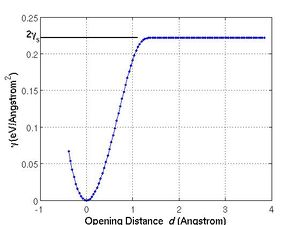
(a) The excess energy per unit area as a function of the opening distance for the SW model of Si.
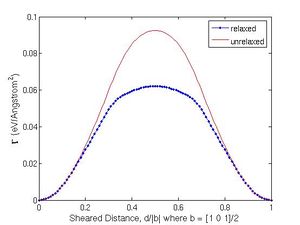
(b) The excess energy per unit area as a function of the slip distance for the SW model of Si.


Ideal Shear Strength
The procedure of calculating ideal shear strength is similar to that of ideal tensile strength except that we usually need to deal with two degrees of freedom. One is the amount of slip Failed to parse (SVG (MathML can be enabled via browser plugin): Invalid response ("Math extension cannot connect to Restbase.") from server "https://wikimedia.org/api/rest_v1/":): {\displaystyle d} in the plane of interest, and the other is the amount of openining Failed to parse (SVG (MathML can be enabled via browser plugin): Invalid response ("Math extension cannot connect to Restbase.") from server "https://wikimedia.org/api/rest_v1/":): {\displaystyle \delta} in the direction normal to the plane. The reason is that we usually need to allow Failed to parse (SVG (MathML can be enabled via browser plugin): Invalid response ("Math extension cannot connect to Restbase.") from server "https://wikimedia.org/api/rest_v1/":): {\displaystyle \delta} to relax when computing the ideal shear strength.
In this example, we will compute the ideal shear strength on a (1 1 1) plane of Si along the Failed to parse (SVG (MathML can be enabled via browser plugin): Invalid response ("Math extension cannot connect to Restbase.") from server "https://wikimedia.org/api/rest_v1/":): {\displaystyle [1 0 \bar{1}]} direction, Failed to parse (SVG (MathML can be enabled via browser plugin): Invalid response ("Math extension cannot connect to Restbase.") from server "https://wikimedia.org/api/rest_v1/":): {\displaystyle \sigma^{\mathrm{th}}_{(111)[10\bar{1}]}} . We start by creating a perfect crystal with repeat vectors Failed to parse (SVG (MathML can be enabled via browser plugin): Invalid response ("Math extension cannot connect to Restbase.") from server "https://wikimedia.org/api/rest_v1/":): {\displaystyle \mathbf{c}_1 = N_x[1 0 \bar{1}]} , Failed to parse (SVG (MathML can be enabled via browser plugin): Invalid response ("Math extension cannot connect to Restbase.") from server "https://wikimedia.org/api/rest_v1/":): {\displaystyle \mathbf{c}_2 = N_y[1 1 1]} and Failed to parse (SVG (MathML can be enabled via browser plugin): Invalid response ("Math extension cannot connect to Restbase.") from server "https://wikimedia.org/api/rest_v1/":): {\displaystyle \mathbf{c}_3 = N_z[1 \bar{2} 1]} .
Next, we perform the following change to the repeat vector Failed to parse (SVG (MathML can be enabled via browser plugin): Invalid response ("Math extension cannot connect to Restbase.") from server "https://wikimedia.org/api/rest_v1/":): {\displaystyle \mathbf{c}_2} while keeping the real coordinates of the atoms fixed,
| Failed to parse (SVG (MathML can be enabled via browser plugin): Invalid response ("Math extension cannot connect to Restbase.") from server "https://wikimedia.org/api/rest_v1/":): {\displaystyle \begin{align} \mathbf{c}_2 &= \left(1+ \frac{\delta}{L_z^0}\mathbf{c}_2^0 + \frac{d}{L_x^0}\mathbf{c}_1^0 \right) \\ &= (L_z^0 + \delta)\mathbf{n} + d\mathbf{m} \end{align} } |
The excess energy per unit area is now a function of both the slip distance Failed to parse (SVG (MathML can be enabled via browser plugin): Invalid response ("Math extension cannot connect to Restbase.") from server "https://wikimedia.org/api/rest_v1/":): {\displaystyle d} and the openning distance Failed to parse (SVG (MathML can be enabled via browser plugin): Invalid response ("Math extension cannot connect to Restbase.") from server "https://wikimedia.org/api/rest_v1/":): {\displaystyle \delta}
| Failed to parse (SVG (MathML can be enabled via browser plugin): Invalid response ("Math extension cannot connect to Restbase.") from server "https://wikimedia.org/api/rest_v1/":): {\displaystyle \gamma = \gamma ( d, \delta ) } . |
For a given Failed to parse (SVG (MathML can be enabled via browser plugin): Invalid response ("Math extension cannot connect to Restbase.") from server "https://wikimedia.org/api/rest_v1/":): {\displaystyle d} , we can let the opening distance Failed to parse (SVG (MathML can be enabled via browser plugin): Invalid response ("Math extension cannot connect to Restbase.") from server "https://wikimedia.org/api/rest_v1/":): {\displaystyle \delta} to relax, which leads to a one dimensional function
| Failed to parse (SVG (MathML can be enabled via browser plugin): Invalid response ("Math extension cannot connect to Restbase.") from server "https://wikimedia.org/api/rest_v1/":): {\displaystyle \Gamma = \displaystyle\min_{\{\delta\} }\gamma ( d ) } . |
The minimization is performed numerically outside MD++, usually within Matlab, based on the 2-dimensional array output from MD++. Fig. 2(b) plots the function Failed to parse (SVG (MathML can be enabled via browser plugin): Invalid response ("Math extension cannot connect to Restbase.") from server "https://wikimedia.org/api/rest_v1/":): {\displaystyle \Gamma(d)} for SW model of Si. Due to the periodicity of the lattice, Failed to parse (SVG (MathML can be enabled via browser plugin): Invalid response ("Math extension cannot connect to Restbase.") from server "https://wikimedia.org/api/rest_v1/":): {\displaystyle \Gamma(d)} is a periodic function, with the periodicity being the length of the Burgers vector. Again, the slope of the Failed to parse (SVG (MathML can be enabled via browser plugin): Invalid response ("Math extension cannot connect to Restbase.") from server "https://wikimedia.org/api/rest_v1/":): {\displaystyle \Gamma(d)} curve also has the unit of stress. The maximum slope is defined as the ideal shear strength, which is 9.5 GPa for the SW model of Si.
There are two different sets of (1 1 1) planes in a diamond-cubic crystal: the shuffle-set and the glide-set[2]. Since the sliding is localized between the atomic planes at the edge of the simulation cell, whether or not the ideal shear strength is computed on the shuffle-set or the glide-set plane depends on which plane is exposed at the edge of the simulation cell. This can be changed by periodically shifting the atomic structure within the simulation cell (through command pbcshiftatom) before calling changeH_keepR. The syntax for command pbcshfiftatom is
input = [ dx dy dz ] pbcshiftatom
where dx, dy and dz are scaled coordinates of the shift vector. Since the [1 1 1] direction is along the Failed to parse (SVG (MathML can be enabled via browser plugin): Invalid response ("Math extension cannot connect to Restbase.") from server "https://wikimedia.org/api/rest_v1/":): {\displaystyle \mathbf{c}_2} direction, dy is the relevant parameter that will change the type of (1 1 1) plane exposed at the edge of the simulation cell. Whether or not pbcshiftatom is required and, if so, the necessary magnitude of dy can be determined by visually inspect the atomic structure in the X-window. The curves in Fig. 3(a) correspond to the shuffle-set plane[2]. The ideal shear strength on the glide-set plane (77.3 GPa for SW model of Si) is much higher than that on the shuffle-set plane.
- Fig.3
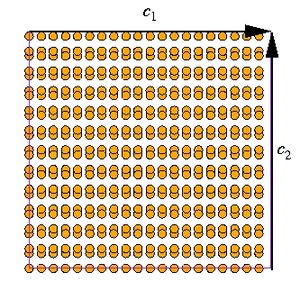
(a) A diamond-cubic structure with glide-set (1 1 1) plane exposed at the edge of the simulation cell (normal to Failed to parse (SVG (MathML can be enabled via browser plugin): Invalid response ("Math extension cannot connect to Restbase.") from server "https://wikimedia.org/api/rest_v1/":): {\displaystyle \mathbf{c}_2} .
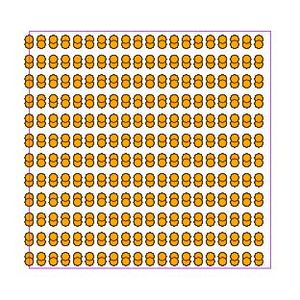
(b) A diamond-cubic structure with shuffle-set (1 1 1) plane exposed at the edge of the simulation cell. The structures in (a) and (b) are identical unless slip occurs at the edge of the simulation cell by tilting repeat vector Failed to parse (SVG (MathML can be enabled via browser plugin): Invalid response ("Math extension cannot connect to Restbase.") from server "https://wikimedia.org/api/rest_v1/":): {\displaystyle \mathbf{c}_2} .


Gamma Surface
The above procedure allows us to compute the ideal shear strength on a specified plane along a specific slip direction. However, there are two orthgonal directions within every plane along which slip can occur. The excess energy per unit area as a function of the two-dimensional slip vector can be visualized as a surface, and is usually called the Failed to parse (SVG (MathML can be enabled via browser plugin): Invalid response ("Math extension cannot connect to Restbase.") from server "https://wikimedia.org/api/rest_v1/":): {\displaystyle \gamma} -surface, or the generalized stacking fault energy.
We have implemented a command calmisfit in MD++ that, together with an external Matlab program, computes the Failed to parse (SVG (MathML can be enabled via browser plugin): Invalid response ("Math extension cannot connect to Restbase.") from server "https://wikimedia.org/api/rest_v1/":): {\displaystyle \gamma} -surface. The command calmisfit itself computes the misfit energy Failed to parse (SVG (MathML can be enabled via browser plugin): Invalid response ("Math extension cannot connect to Restbase.") from server "https://wikimedia.org/api/rest_v1/":): {\displaystyle \gamma} as a function of three parameters: two for the 2-dimensional slip vector within the plane and one for the opening displacement Failed to parse (SVG (MathML can be enabled via browser plugin): Invalid response ("Math extension cannot connect to Restbase.") from server "https://wikimedia.org/api/rest_v1/":): {\displaystyle \delta} perpendicular to the plane. The minimization w.r.t. Failed to parse (SVG (MathML can be enabled via browser plugin): Invalid response ("Math extension cannot connect to Restbase.") from server "https://wikimedia.org/api/rest_v1/":): {\displaystyle \delta} is performed in the Matlab program. The syntax for this command is
 input = [ surfacenormal
           x0 dx x1
           y0 dy y1
           z0 dz z1 ]
 calmisfit
The input variable needs ten elements, the first of which indicates the surface normal index. For example, if surfacenormal = 2, the slip plane is normal to the Failed to parse (SVG (MathML can be enabled via browser plugin): Invalid response ("Math extension cannot connect to Restbase.") from server "https://wikimedia.org/api/rest_v1/":): {\displaystyle \mathbf{c}_2} vector. The following nine numbers specifies the range and incremental steps of the offset vector in three directions. In the case study shown in Figs. 1(b) and 2(b), x0, dx, x1 specify the range of Failed to parse (SVG (MathML can be enabled via browser plugin): Invalid response ("Math extension cannot connect to Restbase.") from server "https://wikimedia.org/api/rest_v1/":): {\displaystyle d} , in units of Failed to parse (SVG (MathML can be enabled via browser plugin): Invalid response ("Math extension cannot connect to Restbase.") from server "https://wikimedia.org/api/rest_v1/":): {\displaystyle |\mathbf{c}_1|/N_x} . y0, dy, y1 specify the range of Failed to parse (SVG (MathML can be enabled via browser plugin): Invalid response ("Math extension cannot connect to Restbase.") from server "https://wikimedia.org/api/rest_v1/":): {\displaystyle \delta} , in units of Failed to parse (SVG (MathML can be enabled via browser plugin): Invalid response ("Math extension cannot connect to Restbase.") from server "https://wikimedia.org/api/rest_v1/":): {\displaystyle |\mathbf{c}_2|/N_y} . Since we are not interested in slip along the Failed to parse (SVG (MathML can be enabled via browser plugin): Invalid response ("Math extension cannot connect to Restbase.") from server "https://wikimedia.org/api/rest_v1/":): {\displaystyle \mathbf{c}_3} direction, we have set z0 = dz = z1 = 0.
Command calmisfit produces a text output file “Emisfit.out”, which is then analyzed by the Matlab program cal_idealstr.m to perform minimization w.r.t. Failed to parse (SVG (MathML can be enabled via browser plugin): Invalid response ("Math extension cannot connect to Restbase.") from server "https://wikimedia.org/api/rest_v1/":): {\displaystyle \delta} and to compute the ideal shear strength. The source code for the cal_idealstr.m program is attached at the end of this manual.
Computing Ideal Shear Strength without Tilting Simulation Cell
For technical reasons, sometimes we cannot tilt the repeat vectors in MD++ when computing the ideal shear strength. For example, the meam-baskes program requires linking the C-programs of MD++ with a set of Fortran programs (provided by Dr. Mike Baskes) that implements the MEAM potential. Unfortunately, the three repeat vectors are not allowed to tilt arbitrarily in these Fortran programs. In this case, the approach described above will no longer apply. A new algorithm is needed to compute the ideal shear strength and the Failed to parse (SVG (MathML can be enabled via browser plugin): Invalid response ("Math extension cannot connect to Restbase.") from server "https://wikimedia.org/api/rest_v1/":): {\displaystyle \gamma} -surface. This is implemented in command calmisfit2.
calmisfit2 litterally moves one block of atoms w.r.t. to the remaining block of atoms, as shown in Fig. 4(a). This creates an interface between the two blocks of atoms. To avoid creating another (unwanted) interface at the periodic boundary, we need to remove several layers of atoms at the edge of the simulation cell before calling calmisfit2.
Fig. 4(a) shows the initial configuration in which a few layers at top and bottom are removed in order to have room for atoms to be shifted as shown in Fig. 4(b). Other than that, the rest of process to get the ideal shear strength is identical.
In MD++, we can remove a block of atom using commands fixatoms_by_position and removefixedatoms. The syntax is
input = [enable x0 x1 y0 y1 z0 z1 ] fixatoms_by_position removefixedatoms
enable = 1 is required to activate the command, and the following 6 parameters specifies a parallelepiped volume (in scaled coordinates). All atoms within this volume will be labeled as fixed by the command fixatoms_by_positions. The following command removefixedatoms then removes these atoms. To remove two blocks of atoms at the top and bottom of the simulation cell, as shown in Fig. 4(a), the above commands need to be called twice with different input parameters.
The syntax for calling command calmisfit2 is the following,
 input = [ surfacenormal
           x0 dx x1
           y0 dy y1
           z0 dz z1
           xmin xmax ymin ymax zmin zmax]
 calmisfit2
The first ten parameters have the same meaning as those for calmisfit. The last 6 parameters specify the parallelepiped volume (enclosed by the solid lines in Fig. 4(a)) which will be shifted w.r.t. the remaining part of the crystal. The command calmisfit2 also produces a text file, “Emisfit.out”, which has the same format as that produced by calmisfit. The same Matlab program (cal_idealstr.m) is able to compute the ideal strength using it as the input.
- Fig.4
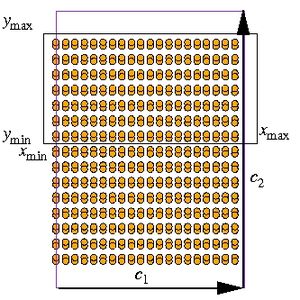
(a) Atomistic structure for computing ideal shear strength when the periodic repeat vectors are not allowed to tilt. Several layers of atoms at the top and bottom of the simulation cell are removed. The atoms inside the volume enclosed by the solid lines will be displaced w.r.t. the remaining atoms.
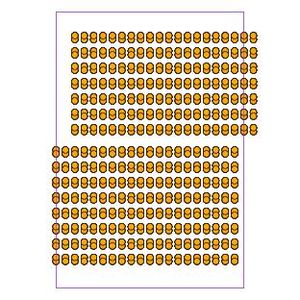
(b) Atomistic structure after the atoms inside the volume specified in (a) are displaced.


Script
The MD++ script (idealstr.tcl) and the Matlab program (cal_idealstr.m) are attached below. You can use them to reproduce the results described above. For example,
$ bin/sw_gpp scripts/work/idealstr.tcl 0
computes the excess energy per unit area as a function of openning displacement perpendicular to the (1 1 0) plane. On the other hand,
$ bin/sw_gpp scripts/work/idealstr.tcl 1
computes the misfit energy of (1 1 1) plane along Failed to parse (SVG (MathML can be enabled via browser plugin): Invalid response ("Math extension cannot connect to Restbase.") from server "https://wikimedia.org/api/rest_v1/":): {\displaystyle [1\, 0\, \bar{1}]} direction by tilting the periodic repeat vector Failed to parse (SVG (MathML can be enabled via browser plugin): Invalid response ("Math extension cannot connect to Restbase.") from server "https://wikimedia.org/api/rest_v1/":): {\displaystyle \mathbf{c}_2} . Finally,
$ bin/sw_gpp scripts/work/idealstr.tcl 2
computes the same misfit energy as above without tilting the periodic repeat vector.
After performing the above MD++ calculation, several files will be generated in the output directory, including Esurf.dat (for tensile strength) and Emisfit.dat (for shear strength). Copying the Matlab program into the same directory and running this Matlab program will produce energy curves and ideal strength values reported as above.
MD++ Input Script idealstr.tcl
# -*-shell-script-*-
source "scripts/Examples/Tcl/startup.tcl"
#*******************************************
# Definition of procedures
#*******************************************
proc initmd { } {
  MD++ setnolog
  MD++ setoverwrite
  MD++ dirname = runs/si_idealstr
  MD++ NIC = 200 NNM = 200
}

proc openwindow { } { MD++ {
# Plot Configuration
  atomradius = 0.67 bondradius = 0.3 bondlength = 0
  atomcolor = orange bondcolor = red backgroundcolor = gray70
  win_width = 300 win_height = 300
  plotfreq = 10 rotateangles = [ 0 0 0 1.25 ]
  plot_atom_info = 1 # reduced coordinates of atoms
#  plot_atom_info = 2 # real coordinates of atoms
#  plot_atom_info = 3 # energy of atoms
openwin alloccolors rotate saverot eval plot
} }

#*******************************************
# Main program starts here
#*******************************************
if { $argc == 0 } {
  set status 0
} elseif { $argc > 0 } {
  set status [lindex $argv 0]
}

puts "status = $status"

if { $status == 0 } {
# calculate surface opening energy on (1 1 0).
  initmd
  MD++ {
    element0 = Si latticeconst = 5.43095
    crystalstructure = diamond-cubic
    latticesize = [ 1 1 0 5
                   -1 1 0 5
                    0 0 1 7 ]
    makecrystal }
  MD++ saveH eval
  set Lx0 [MD++_Get H_11]
  set Ly0 [MD++_Get H_22]
  set Lz0 [MD++_Get H_33]
  set EPOT0 [MD++_Get EPOT]
  set Area [expr $Ly0 * $Lz0]
  set fileID [open "Esurf.dat" w]
  for {set i -10} {$i <= 100} {incr i} {
    set strain [expr $i/1000.0]
    MD++ restoreH RHtoS
    MD++ input = \[ 1 1 $strain \] changeH_keepR
    MD++ clearR0 # enforce refresh neighbor list
    MD++ eval
    set Lx [MD++_Get H_11]
    set dist [expr $Lx - $Lx0]
    set EPOT [MD++_Get EPOT]
    # Esurf2 : excessive energy per area to create 2 free surfaces.
    set Esurf2 [expr ($EPOT - $EPOT0)/$Area]
    puts $fileID "[format %18.14e $dist]\t \
                  [format %18.14e $Esurf2]"
  }
  close $fileID
  MD++ quit

} elseif { $status == 1 } {
# calculate generalized stacking fault energy on (1 1 1) along [1 0 -1]
  initmd
# surface normal direction 1/x 2/y 3/z
  set surfacenormal 2
  set lattconst 5.43095
  set c1 "1 0 -1"; set c2 "1 1 1"; set c3 "1 -2 1"
  set Nx 5; set Ny 4; set Nz 3

  set gridx " 0.000 0.005 0.500"
  set gridy "-0.050 0.010 0.150"
  set gridz " 0.000 0.050 0.000"

# write the matlab script
  set fileID [open "parameter.m" w]
  puts $fileID "normaldir = $surfacenormal"
  puts $fileID "latticeconst = $lattconst"
  puts $fileID "latticesize = \[ $c1 $Nx "
  puts $fileID "                 $c2 $Ny "
  puts $fileID "                 $c3 $Nz \]"
  puts $fileID "dxyz = \[ $gridx "
  puts $fileID "          $gridy "
  puts $fileID "          $gridz \]"
  close $fileID

  MD++ {
    element0 = Si
    crystalstructure = diamond-cubic
  }
  MD++ latticeconst = $lattconst
  MD++ latticesize = \[$c1 $Nx $c2 $Ny $c3 $Nz\]
  MD++ makecrystal

# To make shuffle set of (111) plane exposed
  MD++ { input = [0 0.05 0 ] pbcshiftatom }
  MD++ input = \[ $surfacenormal $gridx $gridy $gridz \]
  MD++ calmisfit
  MD++ quit

} elseif { $status == 2 } {
# calculate generalized stacking fault energy on (1 1 1) along [1 0 -1]
  initmd
# surface normal direction 1/x 2/y 3/z
  set surfacenormal 2
  set lattconst 5.431
  set c1 "1 0 -1"; set c2 "1 1 1"; set c3 "1 -2 1"
  set Nx 5; set Ny 6; set Nz 3
  set gridx " 0.000 0.005 0.500"
  set gridy "-0.050 0.010 0.150"
  set gridz " 0.000 0.050 0.000"
  set xmin -1.00; set xmax 1.00
  set ymin  0.01; set ymax 1.00
  set zmin -1.00; set zmax 1.00

# write the matlab script
  set fileID [open "parameter.m" w]
  puts $fileID "normaldir = $surfacenormal"
  puts $fileID "latticeconst = $lattconst"
  puts $fileID "latticesize = \[ $c1 $Nx "
  puts $fileID "                 $c2 $Ny "
  puts $fileID "                 $c3 $Nz \]"
  puts $fileID "dxyz = \[ $gridx "
  puts $fileID "          $gridy "
  puts $fileID "          $gridz \]"
  close $fileID

  MD++ {
    element0 = Si
    crystalstructure = diamond-cubic
  }
  MD++ latticeconst = $lattconst
  MD++ latticesize = \[$c1 $Nx $c2 $Ny $c3 $Nz\]
  MD++ makecrystal

  MD++ input = \[1 -1 1 0.4 1 -1 1 \] fixatoms_by_position removefixedatoms
  MD++ input = \[1 -1 1 -1 -0.42 -1 1 \] fixatoms_by_position removefixedatoms
  MD++ input = \[ $surfacenormal $gridx $gridy $gridz $xmin $xmax $ymin $ymax $zmin $zmax \]
  MD++ calmisfit2

  openwindow
  MD++ sleep quit
  MD++ quit

} else {
puts "unknown status = $status"
MD++ quit
}
Matlab Program cal_idealstr.m
%#! /usr/local/bin/octave -qf
% Matlab script, cal_idealstr.m
% to calculate ideal tensile strength "sigma" and shear strength "tau"
clear

%%%%%%%%%%%%%%%%%%%%%%%%%%%%%%%%%%%%%%%%%%%%%%%%%%%%%%%%%
% calculate ideal tensile strength along [110] direction
%%%%%%%%%%%%%%%%%%%%%%%%%%%%%%%%%%%%%%%%%%%%%%%%%%%%%%%%%
data = load(’Esurf.dat’);
d = data(:,1);     % openning distance in A
gamma = data(:,2); % excessive energy per area creating 2 free surfaces (eV/A^2)

sigma = max(gamma(2:end)-gamma(1:end-1))/(d(2) - d(1)) * 160.2;
disp(sprintf(’Ideal tensile stregnth = %e(GPa)’,sigma));

figure(1)
set(gca,’fontsize’,14)
plot(d, gamma, ’.-’), grid
xlabel(’Opening Distance \it d \rm(Angstrom)’,’fontsize’,16),
ylabel(’\gamma (eV/Angstrom^2)’,’fontsize’,16)
line([-1 1.1],[gamma(end) gamma(end)],’linewidth’,2,’color’,’k’)
text(-1.3, gamma(end),’2\gamma_s’,’fontsize’,16)

%%%%%%%%%%%%%%%%%%%%%%%%%%%%%%%%%%%%%%%%%%%%%%%%%%%%%%%%%%%%%%%%
% calculate ideal shear strength on (111) along [110] direction
%%%%%%%%%%%%%%%%%%%%%%%%%%%%%%%%%%%%%%%%%%%%%%%%%%%%%%%%%%%%%%%%
if (~exist(’parameter.m’,’file’))
    error(’No parameter.m found’)
else
    parameter

    dx = dxyz(1,2); dy = dxyz(2,2); dz = dxyz(3,2);
    vx = latticesize(1,1:3); Lx = latticeconst*norm(vx);
    vy = latticesize(2,1:3); Ly = latticeconst*norm(vy);
    vz = latticesize(3,1:3); Lz = latticeconst*norm(vz);

    data = load(’Emisfit.out’);
    Mx=max(data(:,1)); My=max(data(:,2)); Mz=max(data(:,3));

%%%%%%%%%%%%%%%%%%%%%%%%%%%%%%%%%%%%
% convert data to relaxed energy
    MM=-sort(-[Mx+1,My+1,Mz+1]);         % Then MM(1) > MM(2) > MM(3)
    E = reshape(data(:,4),MM(1),MM(2));

    Erlx = zeros(MM(1),1);
    Zrlx = zeros(MM(1),1);

    normalgrid = dxyz(normaldir,1):dxyz(normaldir,2):dxyz(normaldir,3);
    normalfinegrid = dxyz(normaldir,1):dxyz(normaldir,2)/1000:dxyz(normaldir,3);

    for i = 1:MM(1),
        a = E(i,:);
        a_interp = interp1(normalgrid,a,normalfinegrid,’spline’);
        [Erlx(i), ind] = min(a_interp);
        Zrlx(i) = normalfinegrid(ind);
    end

% retrieve unrelaxed energy
    Eunrlx=E(:,find(abs(normalgrid)<1e-8));

% calculate ideal shear strength
    tau = max(Erlx(2:end)-Erlx(1:end-1))/(dx*Lx) * 160.2;
    disp(sprintf(’Ideal shear stregnth = %e(GPa)’,tau));

    figure(2); set(gca,’fontsize’,14)
    plot([0:Mx]/Mx, Erlx-Erlx(1), ’b.-’,...
         [0:Mx]/Mx, Eunrlx-Eunrlx(1),’r-’);
    legend(’relaxed’,’unrelaxed’);
    xlabel(’Sheared Distance, d/|b| where b = [1 0 1]/2’,’fontsize’,16)
    ylabel(’\Gamma (eV/Angstrom^2)’,’fontsize’,16)

    figure(3); set(gca,’fontsize’,14)
    plot([0:Mx]/Mx,Zrlx, ’r.-’, ...
         [0 1],[1 1]*dxyz(normaldir,1),’b-’,...
         [0 1],[1 1]*dxyz(normaldir,3),’b-’);
    xlabel(’Sheared Distance, d/|b| where b = [1 0 1]/2’,’fontsize’,16)
    ylabel({’Lowest energy height,’; ’\delta/|c_2| where c_2 = [1 1 1]’},’fontsize’,16)
end
Shell script for Computing Ideal Tensile strength by VASP
#!/bin/bash
#rm WAVECAR summary
#declare -i x=9000
declare -i x=15000
while (($x < 16100))
do
a=$(echo "scale=3; $x/10000" | bc -l)
cat > POSCAR << FIN
Si    comment line
5.389            universal scaling factor
  $a  $a  0.0     first  lattice vector
 -1.0 1.0 0.0     second lattice vector
  0.0 0.0 1.0     third  lattice vector
 16               number of atoms per species
selective dynamics
cart           direct or cart (only first letter is significant)
 -0.5000000000000000   0.5000000000000000   0.0000000000000000 F F F
 -0.2500000000000000   0.7500000000000000   0.2500000000000000 F F F
 -0.7500000000000000   0.7500000000000000   0.7500000000000000 F F F
 -0.2500000000000000   0.2500000000000000   0.7500000000000000 F F F
 -0.5000000000000000   1.0000000000000000   0.5000000000000000 F F F
 -0.2500000000000000   1.2500000000000000   0.7500000000000000 F F F
  0.0000000000000000   0.0000000000000000   0.0000000000000000 F F F
  0.5000000000000000   0.5000000000000000   0.0000000000000000 F F F
  0.0000000000000000   0.5000000000000000   0.5000000000000000 F F F
  0.2500000000000000   0.2500000000000000   0.2500000000000000 F F F
  0.7500000000000000   0.7500000000000000   0.2500000000000000 F F F
  0.2500000000000000   0.7500000000000000   0.7500000000000000 F F F
  0.0000000000000000   1.0000000000000000   0.0000000000000000 F F F
  0.0000000000000000   1.5000000000000000   0.5000000000000000 F F F
  0.5000000000000000   1.0000000000000000   0.5000000000000000 F F F
  0.2500000000000000   1.2500000000000000   0.2500000000000000 F F F
FIN

#echo "a=$a"
#./vasp
vasp
#~/Codes/VASP/Si_Bulk/vasp
E=`tail -1 OSZICAR`
echo $a $E >> summary
#cp CONTCAR POSCAR
let x+=100
done