ShElastic Manuals
ShElastic is the python code for the paper
Wang, Y., Zhang, X., & Cai, W. (2019). Spherical Harmonics Method for Computing the Image Stress Due to A Spherical Void. Journal of the Mechanics and Physics of Solids.
doi:10.1016/j.jmps.2019.01.020
The code is tested under Ubuntu 16.04 LTS. with package python 3.6, numpy 1.15, scipy 1.0, matplotlib 3.0, jupyter, and SHTOOLS 4.3. Please see Install_SHTOOLS for more details on installing required packages
Obtain the ShElastic package
Please download the package using git:
git clone https://gitlab.com/micronano/ShElastic.git
or directly from https://gitlab.com/micronano/ShElastic
Suggested Installation of SHTOOLS (pip)
If you have python3 and pip installed on your machine, you can simply install everything by:
python3 -m pip install --user numpy scipy matplotlib ipython jupyter pandas sympy nose pyshtools
Generate coefficients
The coefficients up to lmax = 60 is pre-computed and included in the repository. If you want to use higher mode spherical harmonic basis, please continue reading.
Please change the first few lines in `ShElastic/scripts/generate_modes.py`:
lKfull = 10
lJfull = lKfull + 3
savepath = '../module/lmax%dmodes'%lKfull
...
Then we can generate the mode files by calling:
cd ShElastic/scripts
python3 generate_modes.py
The mode files will be saved in the savepath folder.
Reproduce results from the paper
The results showing in the paper can be reproduced by running the jupyter notebooks in `ShElastic/notebook` folder.
Numerical Case 1: `Case01-Uniform_Tensile_Hole.ipynb`
Numerical Case 2: `Case02-Void_Dislocation_Interaction.ipynb`
Numerical Case 3: `Case03-Prismatic_Dislocation_Loop.ipynb`
Launch the jupyter notebook by:
cd ShElastic
jupyter notebook
After you run through the notebooks, the result files will be saved in `ShElastic/figures`. The figures in the paper can be reproduced by running plotdata.m in matlab.
- Fig.1 generated figures for the paper
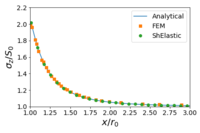
(a) Case 1
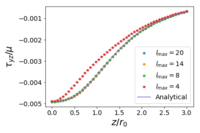
(b) Case 2
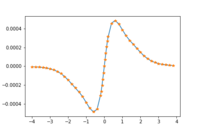
(c) Case 3


