Install SHTOOLS
SHTOOLS is a package for spherical harmonics transformation and reconstructions. The current version (SHTOOLS3.4) is available in python and Fortran 95. In this article, we are introducing the installation of SHTOOLS python packages on your own computer and mc2 cluster.
How to Install SHTOOLS on Your Own Computer
On Mac or Linux, you will need to have fortran compiler, lapack/blas, and fftw3 available. This can be done simply by running the following commands with homebrew on Mac:
brew install fftw --with-fortran
or Linux:
sudo apt-get install libblas-dev liblapack-dev g++ gfortran libfftw3-dev tcsh
If you have installed python and the package manager pip, you can install the shtools directly by running the command:
pip install pyshtools
Then if you run command:
pip list
You will see pyshtools library is available in your python packages.
How to Install SHTOOLS on mc2
On mc2 cluster, since we can only install packages for user only, we are not allowed to use sudo command to install the required packages. We need to compile the packages by our own.
For compiling shtools, the required packages are fftw3, lapack, and blas. Libraries for lapack and blas are available on mc2, we can use them directly for compiling shtools. For installing fftw3, please refer to Install_FFTW3 for more details.
After you followed the steps in FFTW3 installation (Serial only), you should have all the fftw3 libraries available:
~/usr/include/fftw3.h
~/usr/include/fftw3.f
~/usr/lib/libfftw3.a
~/usr/lib/libfftw3.la
~/usr/lib/libfftw3.so
And also, run the command:
ls /usr/lib64
The libraries for lapack and blas should be available here:
/usr/lib64/liblapack.a
/usr/lib64/liblapack.so
/usr/lib64/liblapack.so.3
...
/usr/lib64/libblas.a
/usr/lib64/libblas.so
/usr/lib64/libblas.so.3
...
Before we proceed, we need to make sure to have python installed.
Install python + scipy + SHTOOLS on local directory
We create a local folder .localpython for installing python:
mkdir ~/.localpython
download python source code:
mkdir ~/soft
cd ~/soft
wget http://www.python.org/ftp/python/X.X.X/Python-X.X.X.tgz
tar -xvf Python-X.X.X.tgz
cd Python-X.X.X
compile python from source and install to local directory:
make clean
./configure --enable-shared --prefix=${HOME}/.localpython
make
make install
if python version < 2.7.9, install pip by:
wget https://bootstrap.pypa.io/get-pip.py
python get-pip.py
Install SciPy Stack using pip on user's directory:
pip(pip3) install --user numpy scipy matplotlib ipython jupyter pandas sympy nose
export PATH="$PATH:${HOME}/.local/bin"
Install pyshtools using pip: First, we put the pre-compiled FFTW3 libraries into LIBRARY_PATH:
export LIBRARY_PATH=$LIBRARY_PATH:${HOME}/usr/lib
export LD_LIBRARY_PATH=$LD_LIBRARY_PATH:${HOME}/usr/lib
Then we can install pyshtools through pip on user's directory:
pip(pip3) install --user pyshtools
Compile SHTOOLS
load the python module (we use python 2 as an example):
module load python/2.7.8 (Whichever is available)
Also make sure you have numpy available:
pip list
Then you are ready to install shtools on your mc2 account.
First, download the shtools source package from Releases
cd ~/soft
wget https://github.com/SHTOOLS/SHTOOLS/archive/v3.4.tar.gz
tar -zxvf v3.4.tar.gz
cd SHTOOLS-3.4
Then, indicate the libraries and compile the source code:
export LD_LIBRARY_PATH=$LD_LIBRARY_PATH:"$HOME/usr/lib"
make python2 LAPACK="-L/usr/lib64 -llapack" BLAS="-L/usr/lib64 -lblas" FFTW="-L$HOME/usr/lib -lfftw3"
The output should be something look like this. Then your package is ready for use. If you are compiling with python 3, just change "python2" to "python3" in the command above.
To load the SHTOOLS module in python, use the following lines:
import sys
sys.path.append('$HOME/soft/SHTOOLS-3.4')
import pyshtools as shtools
where the "$HOME" has to be substituted by your own home folder path.
Examples for using SHTOOLS in python
We consider a simple example where we do the spherical expansion of function on the surface of a unit sphere.

First we import the necessary packages:
from __future__ import print_function # only necessary if using Python 2.x
import numpy as np
import sys
sys.path.append('/home/yfwang09/soft/SHTOOLS-3.4')
import pyshtools as psh
Then we generate the mesh grids for the spherical coordinates (Nx2N grids for latitude and longitude variables Failed to parse (SVG (MathML can be enabled via browser plugin): Invalid response ("Math extension cannot connect to Restbase.") from server "https://wikimedia.org/api/rest_v1/":): {\displaystyle \phi, \theta} ; or Failed to parse (SVG (MathML can be enabled via browser plugin): Invalid response ("Math extension cannot connect to Restbase.") from server "https://wikimedia.org/api/rest_v1/":): {\displaystyle \pi/N} latitudinal and Failed to parse (SVG (MathML can be enabled via browser plugin): Invalid response ("Math extension cannot connect to Restbase.") from server "https://wikimedia.org/api/rest_v1/":): {\displaystyle 2\pi/2N} longitudinal, both start from 0):
Ngrid = 100
phi = np.linspace(0, np.pi, Ngrid)
theta = np.linspace(0, 2*np.pi, 2*Ngrid)
THETA, PHI = np.meshgrid(theta, phi) # make the grid size as Nx2N
where the grid PHI and THETA both have N rows and 2N columns. Then we translate the Cartesian coordinates into the spherical meshgrids, and generate the target function into spherical coordinates:
Z = np.cos(PHI);
X = np.sin(PHI)*np.cos(THETA);
Y = np.sin(PHI)*np.sin(THETA);
X2 = X**2
Finally we expand the target function into spherical harmonic series:
cilm = np.empty([2,Ngrid/2,Ngrid/2])
filename = 'xsquare'
cilm = psh.expand.SHExpandDH(X2, sampling=2)
np.savetxt(filename+'_clm.txt', cilm[0,:,:], header='Row: l, Column: m')
np.savetxt(filename+'_slm.txt', cilm[1,:,:], header='Row: l, Column: m')
where cilm represent the coefficients of different spherical harmonic modes. cilm[0, l, m] and cilm[1, l, m] are the cosine and sine modes of spherical harmonics. The parameter sampling=2 means that we are using the grid Nx2N instead of NxN.
See the page SHExpandDH for the detailed description of the expanding function and the page Real Spherical Harmonics for mathematical definition.
Visualization of spherical harmonic modes using scipy
We first import the necessary packages:
import numpy as np
from scipy.special import sph_harm
import matplotlib.pyplot as plt
from matplotlib import cm, colors
from mpl_toolkits.mplot3d import Axes3D
For a certain pair of parameters (m, l), we can plot the corresponding spherical harmonic mode Y(l, m) on the surface of a unit sphere using scipy and matplotlib packages. Here we use the meshgrid THETA, PHI, X, Y, and Z we generated in the previous section:
fvalues = sph_harm(m, l, THETA, PHI).real  # Get the values of spherical harmonic functions
fmax, fmin = fvalues.max(), fvalues.min()
fcolors = (fvalues - fmin)/(fmax - fmin)    # normalize the values into range [0, 1]
Then we plot Y(l, m) on a sphere:
fig = plt.figure(figsize=plt.figaspect(1.))  # make the axis with equal aspects
ax = fig.add_subplot(111, projection='3d')   # add an subplot object with 3D plot
ax.plot_surface(x, y, z,  rstride=1, cstride=1, facecolors=cm.Blues(fcolors))
plt.show()
For example, the figures for (l, m) = (2, 0), (3, 2), and (1, 1) are shown as below:
- Fig.1 Visualization of Spherical Harmonics
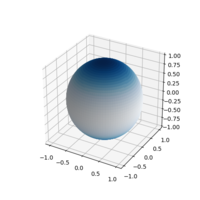
(a) Failed to parse (SVG (MathML can be enabled via browser plugin): Invalid response ("Math extension cannot connect to Restbase.") from server "https://wikimedia.org/api/rest_v1/":): {\displaystyle Y_{20}(\theta,\phi) }
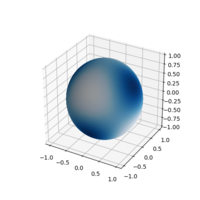
(b) Failed to parse (SVG (MathML can be enabled via browser plugin): Invalid response ("Math extension cannot connect to Restbase.") from server "https://wikimedia.org/api/rest_v1/":): {\displaystyle Y_{32}(\theta,\phi) }
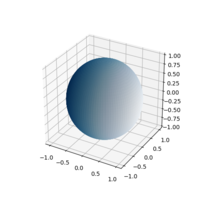
(c) Failed to parse (SVG (MathML can be enabled via browser plugin): Invalid response ("Math extension cannot connect to Restbase.") from server "https://wikimedia.org/api/rest_v1/":): {\displaystyle Y_{11}(\theta,\phi) }


