ShElastic Manuals: Difference between revisions
| Line 55: | Line 55: | ||
Image:Case1_results.png | (a) Case 1 |
Image:Case1_results.png | (a) Case 1 |
||
Image:Case2_results.png | (b) Case 2 |
Image:Case2_results.png | (b) Case 2 |
||
Image:Case3_results.png | (c) Case 3 |
|||
</gallery> |
</gallery> |
||
Revision as of 00:13, 20 February 2019
ShElastic is the python code for the paper
Wang, Y., Zhang, X., & Cai, W. (2019). Spherical Harmonics Method for Computing the Image Stress Due to A Spherical Void. Journal of the Mechanics and Physics of Solids.
The code is tested under Ubuntu 16.04 LTS. with package python 3.6, numpy 1.15, scipy 1.0, matplotlib 3.0, jupyter, and SHTOOLS 4.3. Please see Install_SHTOOLS for more details on installing required packages
Obtain the ShElastic package
Please download the package using git:
git clone https://gitlab.com/micronano/ShElastic.git
or directly from https://gitlab.com/micronano/ShElastic
Suggested Installation of SHTOOLS (pip)
If you have python3 and pip installed on your machine, you can simply install everything by:
python3 -m pip install --user numpy scipy matplotlib ipython jupyter pandas sympy nose pyshtools
Generate coefficients
The coefficients up to l_{max} = 60 is pre-computed and included in the repository. If you want to use higher mode spherical harmonic basis, please continue reading.
Please change the first few lines in `ShElastic/scripts/generate_modes.py`:
lKfull = 10
lJfull = lKfull + 3
savepath = '../module/lmax%dmodes'%lKfull
...
Then we can generate the mode files by calling:
cd ShElastic/scripts
python3 generate_modes.py
The mode files will be saved in the savepath folder.
Reproduce results from the paper
The results showing in the paper can be reproduced by running the jupyter notebooks in `ShElastic/notebook` folder.
Numerical Case 1: `Case01-Uniform_Tensile_Hole.ipynb` Numerical Case 2: `Case02-Void_Dislocation_Interaction.ipynb` Numerical Case 3: `Case03-Prismatic_Dislocation_Loop.ipynb`
Launch the jupyter notebook by:
cd ShElastic
jupyter notebook
The result files will be saved in `ShElastic/figures`. The figures in the paper can be reproduced by running plotdata.m in matlab.
- Fig.1 generated figures for the paper
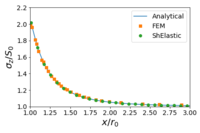
(a) Case 1
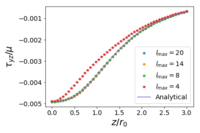
(b) Case 2
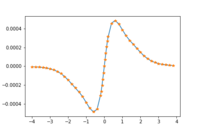
(c) Case 3


