PARADISCYL:Test-Run: Difference between revisions
No edit summary |
|||
| Line 519: | Line 519: | ||
== Tcl script to generate data file == |
== Tcl script to generate data file == |
||
In ParaDiS/tools directory, there is a tcl script '''create_loop_data.tcl''' |
In ParaDiS/tools directory, there is a tcl script '''create_loop_data.tcl'''. By typing the following commnad, |
||
$ tools/create_loop_data.tcl |
|||
you will get the data file '''concentric_loop_test.data''' automatically. |
|||
By manipulating this tcl script, you can easily create a data file for your own ParaDiS simulation. |
|||
create_loop_data.tcl |
|||
<pre> |
|||
#!/usr/bin/tclsh |
|||
#Read status variable from the first argument (if any) |
|||
if { $argc == 0 } { |
|||
set status 0 |
|||
} elseif { $argc > 0 } { |
|||
set status [lindex $argv 0] |
|||
} |
|||
puts "status = $status" |
|||
set datafile "runs/concentric_loop_test.data" |
|||
set version_number 2 |
|||
set filesegments_number 1 |
|||
set L 6 |
|||
set cylinder_radius [expr $L/6] |
|||
set loop_rel_radius 0.8 |
|||
set loop_radius [expr $cylinder_radius * $loop_rel_radius] |
|||
set xBoundMin [expr -$L/2] |
|||
set yBoundMin [expr -$L/2] |
|||
set zBoundMin [expr -$L/2] |
|||
set xBoundMax [expr $L/2] |
|||
set yBoundMax [expr $L/2] |
|||
set zBoundMax [expr $L/2] |
|||
set nodes_number 50 |
|||
set burg_x 1 |
|||
set burg_y 0 |
|||
set burg_z 0 |
|||
set normal_x 0 |
|||
set normal_y 0 |
|||
set normal_z 1 |
|||
set domainID 10 |
|||
set fileID [open $datafile w] |
|||
puts $fileID "#" |
|||
puts $fileID "# ParaDiS nodal data file (by create_loop_data.tcl) " |
|||
puts $fileID "#" |
|||
puts $fileID " " |
|||
puts $fileID "#" |
|||
puts $fileID "# File version number" |
|||
puts $fileID "#" |
|||
puts $fileID " " |
|||
puts $fileID "$version_number" |
|||
puts $fileID " " |
|||
puts $fileID "#" |
|||
puts $fileID "# Number of data file segments" |
|||
puts $fileID "#" |
|||
puts $fileID " " |
|||
puts $fileID "$filesegments_number" |
|||
puts $fileID " " |
|||
puts $fileID "#" |
|||
puts $fileID "# Minimum coordinate values (x, y, z)" |
|||
puts $fileID "#" |
|||
puts $fileID "" |
|||
puts $fileID "$xBoundMin $yBoundMin $zBoundMin " |
|||
puts $fileID " " |
|||
puts $fileID "#" |
|||
puts $fileID "# Maximum coordinate values (x, y, z)" |
|||
puts $fileID "#" |
|||
puts $fileID " " |
|||
puts $fileID "$xBoundMax $yBoundMax $zBoundMax " |
|||
puts $fileID " " |
|||
puts $fileID "#" |
|||
puts $fileID "# Node count" |
|||
puts $fileID "#" |
|||
puts $fileID " " |
|||
puts $fileID "$nodes_number " |
|||
puts $fileID " " |
|||
puts $fileID "#" |
|||
puts $fileID "# Domain geometry (x, y, z)" |
|||
puts $fileID "#" |
|||
puts $fileID " " |
|||
puts $fileID "1 1 1 " |
|||
puts $fileID " " |
|||
puts $fileID "#" |
|||
puts $fileID "# Domain boundaries (x, y, z)" |
|||
puts $fileID "#" |
|||
puts $fileID " " |
|||
puts $fileID " $xBoundMin" |
|||
puts $fileID " $yBoundMin" |
|||
puts $fileID " $zBoundMin" |
|||
puts $fileID " $zBoundMax" |
|||
puts $fileID " $yBoundMax" |
|||
puts $fileID " $xBoundMax" |
|||
puts $fileID "#" |
|||
puts $fileID "# Primary lines: node_tag, x, y, z, num_arms, constraint" |
|||
puts $fileID "# Secondary lines: arm_tag, burgx, burgy, burgz, nx, ny, nz" |
|||
puts $fileID "#" |
|||
puts $fileID "# length in unit of burgMag" |
|||
puts $fileID " " |
|||
set minus_burg_x [expr -$burg_x] |
|||
set minus_burg_y [expr -$burg_y] |
|||
set minus_burg_z [expr -$burg_z] |
|||
set Pi 3.1415926535897931 |
|||
for {set n 0} {$n < $nodes_number} {incr n 1} { |
|||
set x [format %22.16e [expr $loop_radius*cos(2*$Pi*($n+1.0)/$nodes_number)]] |
|||
set y [format %22.16e [expr $loop_radius*sin(2*$Pi*($n+1.0)/$nodes_number)]] |
|||
set z 0 |
|||
set arms_number 2 |
|||
set flag 0 |
|||
set n1 [expr $n+1] |
|||
set n2 [expr $n-1] |
|||
if { $n1 == $nodes_number } { set n1 0 } |
|||
if { $n2 == -1 } { set n2 [expr $nodes_number - 1 ] } |
|||
puts $fileID " $domainID,$n $x $y $z $arms_number $flag" |
|||
puts $fileID " $domainID,$n1 $burg_x $burg_y $burg_z " |
|||
puts $fileID " $normal_x $normal_y $normal_z" |
|||
puts $fileID " $domainID,$n2 $minus_burg_x $minus_burg_y $minus_burg_z " |
|||
puts $fileID " $normal_x $normal_y $normal_z" |
|||
} |
|||
close $fileID |
|||
puts "$datafile created." |
|||
puts "bye." |
|||
</pre> |
|||
---- |
---- |
||
Revision as of 21:14, 2 October 2008
Manual 02 for ParaDiS Cylinder Codes
How to run test simulations
Keonwook Kang and Wei Cai
Run command
The ParaDis Cylinder command line format is exactly same with that of the original ParaDiS codes. Refer the ParaDiS manual for detail. The line format is:
paradiscyl [-r <numCycles>] [-d dataFile] <controlFile>
where:
| <ctrlFile> | Specifies the name of the ParaDiS control parameter file | ||
| -d <dataFile> | Specifies the base name of the file(s) containing the nodal data for the run. If this file name is not supplied, the code looks for a data file named the same as the control file with the file name suffix (if any) replaced with ".data" | ||
| -r <numCycles> | Causes the code to execute a series of <numCycles> cycles during which no force calculations or dislocation movement will occur. These cycles will be used strictly for load-balancing purposes and will be done before the normal cycles. This can be useful when a simulation is started with a uniform domain decomposition and needs time to converge on an optimal decomposition as would occur when restarting a simulation on a different number of cpus |
Examples
Run the following control file, which simulates a dislocation loop inside a cylinder. You will need two input files: one is control file (concentric_loop_test.ctrl) and the other is data file (concentric_loop_test.data). Both files are shown below. See here for details about input files.
$ bin/paradiscyl runs/concentric_loop_test.ctrl
If you see a new pop-up window shown in Fig.1, you are ready to exploit this tool.
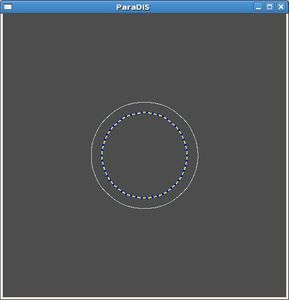
Fig.1 ParaDiS Cylinder Codes Test Run

concentric_loop_test.ctrl
### DD3d configuration file (use -*-shell-script-*- format)
#
#  input file to be used in conjunction with
#  the concentric_loop_test.data file.
#

#Directory to write output files
dirname = "outputs/concentric_loop_test"

#Input files for PBC image stresses
Rijmfile = "inputs/Rijm.cube.out"
RijmPBCfile = "inputs/RijmPBC.cube.out"

#Total simulation steps
maxstep = 100

#The total number of CPUs should be numXdoms * numYdoms * numZdoms
numXdoms = 1
numYdoms = 1
numZdoms = 1

#Cells for dislocation grouping (cannot be less than 3)
numXcells = 3
numYcells = 3
numZcells = 3

#Fast multipole method specs.
fmEnabled = 0  #disable fast multipole
fmMPOrder = 2
fmTaylorOrder = 4
fmCorrectionTbl = "inputs/fm-ctab.m2.t4.dat"

timestepIntegrator = "backward-euler"

# This is necessary!  not really repeated from data file!
xBoundMin = -3.0e0
xBoundMax =  3.0e0
yBoundMin = -3.0e0
yBoundMax =  3.0e0
zBoundMin = -3.0e0
zBoundMax =  3.0e0

#Boundary Conditions
xBoundType = 1  #Free
yBoundType = 1  #Free
zBoundType = 1  #Free

#fundamental length unit
#burgMag = 2.725e-10  #(in m)
burgMag = 1.0e0

#Elastic constants
shearModulus = 1.0e+0
pois = 3.050000e-01

#Mobility Law Function
mobilityLaw = "BCC_0a"
MobScrew = 1e0
MobEdge = 1e1
MobClimb = 1e-8
CheckScrew = 0.95

#Remesh Rule
remeshRule = 2

#Discretization
minSeg = 3.000000e-03
maxSeg = 1.000000e-01

maxDT = 1.000000e+02

#Maximum nodal displacement at each time step
rmax = 1e0

#Core cut-off radius
rc = 1.0e-3

#Core energy
Ecore = 0.0e+0

#Turn on elastic interaction
elasticinteraction = 1

#Applied stress in Pa (xx,yy,zz,yz,zx,xy)
#appliedStress = [  0.   0.  -9e+0  0.  0.  0.  ]
#appliedStress = [ 0 0 0 0 -3e0 0 ]
appliedStress = [ 0 0 0 0 0 0 ]

loadType = 0
indxErate = 2
edotdir = [ 0 0 1 ]
eRate = 150

#Output specs.
savecn = 1
savecnfreq = 10
savecndt = -1.000000e+00
savecntime = 0.000000e+00
savecncounter = 0

saveprop = 1
savepropfreq = 10
savepropdetail = 100
savepropdt = -1.000000e+00
saveproptime = 0.000000e+00

armfile = 1
armfiledt = 1e-3
#Binary restart files
binrestart = 0  #write text instead of binary restart file
binfile = ""
concentric_loop_test.data
#
#       ParaDiS nodal data file (by create_loop_data.tcl)
#

#
#       File version number
#

2

#
#       Number of data file segments
#

1

#
#       Minimum coordinate values (x, y, z)
#

-3 -3 -3

#
#       Maximum coordinate values (x, y, z)
#

3 3 3

#
#       Node count
#

50

#
#       Domain geometry (x, y, z)
#

1   1   1

#
#       Domain boundaries (x, y, z)
#

   -3
       -3
           -3
           3
       3
   3
#
#       Primary lines: node_tag, x, y, z, num_arms, constraint
#       Secondary lines: arm_tag, burgx, burgy, burgz, nx, ny, nz
#
#       length in unit of burgMag

     10,0      7.9369176105158235e-01 1.0026658685144341e-01 0 2 0
           10,1      1 0 0
                       0 0 1
           10,49      -1 0 0
                       0 0 1
     10,1      7.7486652890290486e-01 1.9895190973188384e-01 0 2 0
           10,2      1 0 0
                       0 0 1
           10,0      -1 0 0
                       0 0 1
     10,2      7.4382118871060121e-01 2.9449964214774232e-01 0 2 0
           10,3      1 0 0
                       0 0 1
           10,1      -1 0 0
                       0 0 1
     10,3      7.0104534403509089e-01 3.8540293928137226e-01 0 2 0
           10,4      1 0 0
                       0 0 1
           10,2      -1 0 0
                       0 0 1
     10,4      6.4721359549995805e-01 4.7022820183397851e-01 0 2 0
           10,5      1 0 0
                       0 0 1
           10,3      -1 0 0
                       0 0 1
     10,5      5.8317490193712929e-01 5.4763768474295094e-01 0 2 0
           10,6      1 0 0
                       0 0 1
           10,4      -1 0 0
                       0 0 1
     10,6      5.0993919179895186e-01 6.1641059422063149e-01 0 2 0
           10,7      1 0 0
                       0 0 1
           10,5      -1 0 0
                       0 0 1
     10,7      4.2866143598319728e-01 6.7546234040161213e-01 0 2 0
           10,8      1 0 0
                       0 0 1
           10,6      -1 0 0
                       0 0 1
     10,8      3.4062343325205813e-01 7.2386164197281566e-01 0 2 0
           10,9      1 0 0
                       0 0 1
           10,7      -1 0 0
                       0 0 1
     10,9      2.4721359549995797e-01 7.6084521303612285e-01 0 2 0
           10,10      1 0 0
                       0 0 1
           10,8      -1 0 0
                       0 0 1
     10,10      1.4990505166857981e-01 7.8582980058295093e-01 0 2 0
           10,11      1 0 0
                       0 0 1
           10,9      -1 0 0
                       0 0 1
     10,11      5.0232415623450821e-02 7.9842138274261731e-01 0 2 0
           10,12      1 0 0
                       0 0 1
           10,10      -1 0 0
                       0 0 1
     10,12      -5.0232415623450724e-02 7.9842138274261731e-01 0 2 0
           10,13      1 0 0
                       0 0 1
           10,11      -1 0 0
                       0 0 1
     10,13      -1.4990505166857970e-01 7.8582980058295104e-01 0 2 0
           10,14      1 0 0
                       0 0 1
           10,12      -1 0 0
                       0 0 1
     10,14      -2.4721359549995769e-01 7.6084521303612296e-01 0 2 0
           10,15      1 0 0
                       0 0 1
           10,13      -1 0 0
                       0 0 1
     10,15      -3.4062343325205818e-01 7.2386164197281566e-01 0 2 0
           10,16      1 0 0
                       0 0 1
           10,14      -1 0 0
                       0 0 1
     10,16      -4.2866143598319750e-01 6.7546234040161202e-01 0 2 0
           10,17      1 0 0
                       0 0 1
           10,15      -1 0 0
                       0 0 1
     10,17      -5.0993919179895186e-01 6.1641059422063149e-01 0 2 0
           10,18      1 0 0
                       0 0 1
           10,16      -1 0 0
                       0 0 1
     10,18      -5.8317490193712906e-01 5.4763768474295105e-01 0 2 0
           10,19      1 0 0
                       0 0 1
           10,17      -1 0 0
                       0 0 1
     10,19      -6.4721359549995794e-01 4.7022820183397862e-01 0 2 0
           10,20      1 0 0
                       0 0 1
           10,18      -1 0 0
                       0 0 1
     10,20      -7.0104534403509089e-01 3.8540293928137220e-01 0 2 0
           10,21      1 0 0
                       0 0 1
           10,19      -1 0 0
                       0 0 1
     10,21      -7.4382118871060110e-01 2.9449964214774255e-01 0 2 0
           10,22      1 0 0
                       0 0 1
           10,20      -1 0 0
                       0 0 1
     10,22      -7.7486652890290486e-01 1.9895190973188420e-01 0 2 0
           10,23      1 0 0
                       0 0 1
           10,21      -1 0 0
                       0 0 1
     10,23      -7.9369176105158223e-01 1.0026658685144363e-01 0 2 0
           10,24      1 0 0
                       0 0 1
           10,22      -1 0 0
                       0 0 1
     10,24      -8.0000000000000004e-01 9.7968508305790183e-17 0 2 0
           10,25      1 0 0
                       0 0 1
           10,23      -1 0 0
                       0 0 1
     10,25      -7.9369176105158235e-01 -1.0026658685144343e-01 0 2 0
           10,26      1 0 0
                       0 0 1
           10,24      -1 0 0
                       0 0 1
     10,26      -7.7486652890290497e-01 -1.9895190973188367e-01 0 2 0
           10,27      1 0 0
                       0 0 1
           10,25      -1 0 0
                       0 0 1
     10,27      -7.4382118871060121e-01 -2.9449964214774232e-01 0 2 0
           10,28      1 0 0
                       0 0 1
           10,26      -1 0 0
                       0 0 1
     10,28      -7.0104534403509078e-01 -3.8540293928137231e-01 0 2 0
           10,29      1 0 0
                       0 0 1
           10,27      -1 0 0
                       0 0 1
     10,29      -6.4721359549995827e-01 -4.7022820183397818e-01 0 2 0
           10,30      1 0 0
                       0 0 1
           10,28      -1 0 0
                       0 0 1
     10,30      -5.8317490193712940e-01 -5.4763768474295071e-01 0 2 0
           10,31      1 0 0
                       0 0 1
           10,29      -1 0 0
                       0 0 1
     10,31      -5.0993919179895164e-01 -6.1641059422063149e-01 0 2 0
           10,32      1 0 0
                       0 0 1
           10,30      -1 0 0
                       0 0 1
     10,32      -4.2866143598319706e-01 -6.7546234040161224e-01 0 2 0
           10,33      1 0 0
                       0 0 1
           10,31      -1 0 0
                       0 0 1
     10,33      -3.4062343325205774e-01 -7.2386164197281588e-01 0 2 0
           10,34      1 0 0
                       0 0 1
           10,32      -1 0 0
                       0 0 1
     10,34      -2.4721359549995806e-01 -7.6084521303612285e-01 0 2 0
           10,35      1 0 0
                       0 0 1
           10,33      -1 0 0
                       0 0 1
     10,35      -1.4990505166857970e-01 -7.8582980058295104e-01 0 2 0
           10,36      1 0 0
                       0 0 1
           10,34      -1 0 0
                       0 0 1
     10,36      -5.0232415623450571e-02 -7.9842138274261731e-01 0 2 0
           10,37      1 0 0
                       0 0 1
           10,35      -1 0 0
                       0 0 1
     10,37      5.0232415623450266e-02 -7.9842138274261731e-01 0 2 0
           10,38      1 0 0
                       0 0 1
           10,36      -1 0 0
                       0 0 1
     10,38      1.4990505166857943e-01 -7.8582980058295104e-01 0 2 0
           10,39      1 0 0
                       0 0 1
           10,37      -1 0 0
                       0 0 1
     10,39      2.4721359549995781e-01 -7.6084521303612296e-01 0 2 0
           10,40      1 0 0
                       0 0 1
           10,38      -1 0 0
                       0 0 1
     10,40      3.4062343325205746e-01 -7.2386164197281599e-01 0 2 0
           10,41      1 0 0
                       0 0 1
           10,39      -1 0 0
                       0 0 1
     10,41      4.2866143598319745e-01 -6.7546234040161202e-01 0 2 0
           10,42      1 0 0
                       0 0 1
           10,40      -1 0 0
                       0 0 1
     10,42      5.0993919179895142e-01 -6.1641059422063171e-01 0 2 0
           10,43      1 0 0
                       0 0 1
           10,41      -1 0 0
                       0 0 1
     10,43      5.8317490193712895e-01 -5.4763768474295116e-01 0 2 0
           10,44      1 0 0
                       0 0 1
           10,42      -1 0 0
                       0 0 1
     10,44      6.4721359549995794e-01 -4.7022820183397873e-01 0 2 0
           10,45      1 0 0
                       0 0 1
           10,43      -1 0 0
                       0 0 1
     10,45      7.0104534403509056e-01 -3.8540293928137292e-01 0 2 0
           10,46      1 0 0
                       0 0 1
           10,44      -1 0 0
                       0 0 1
     10,46      7.4382118871060121e-01 -2.9449964214774232e-01 0 2 0
           10,47      1 0 0
                       0 0 1
           10,45      -1 0 0
                       0 0 1
     10,47      7.7486652890290486e-01 -1.9895190973188429e-01 0 2 0
           10,48      1 0 0
                       0 0 1
           10,46      -1 0 0
                       0 0 1
     10,48      7.9369176105158223e-01 -1.0026658685144373e-01 0 2 0
           10,49      1 0 0
                       0 0 1
           10,47      -1 0 0
                       0 0 1
     10,49      8.0000000000000004e-01 -1.9593701661158037e-16 0 2 0
           10,0      1 0 0
                       0 0 1
           10,48      -1 0 0
                       0 0 1
Visualization Window control
Hot keys to manipulate the object displayed in the X window in Fig.1. For example, press r and then use arrow keys to rotate the object.
YWindow: yview:
Mouse drag to rotate
Hot Keys:
F1        : display this message
Up        : rotate up
Down      : rotate down
Left      : rotate left
Right     : rotate right
PgUp      : rotate counterclockwise
PgDn      : rotate clockwise
Home      : back to initial viewpoint
Space     : stop rotate
p         : toggle pause
t         : translation
s         : scaling
d         : move projection infinity point
r         : rotation
f         : toggle pbc enableness
m         : toggle drawframe
g         : pbc glide
x         : pbc shift in x
y         : pbc shift in y
z         : pbc shift in z
w         : print window specification
F9        : output gif
F10       : output postscript
Tcl script to generate data file
In ParaDiS/tools directory, there is a tcl script create_loop_data.tcl. By typing the following commnad,
$ tools/create_loop_data.tcl
you will get the data file concentric_loop_test.data automatically. By manipulating this tcl script, you can easily create a data file for your own ParaDiS simulation.
create_loop_data.tcl
#!/usr/bin/tclsh

#Read status variable from the first argument (if any)
if { $argc == 0 } {
 set status 0
} elseif { $argc > 0 } {
 set status [lindex $argv 0]
}
puts "status = $status"

set datafile "runs/concentric_loop_test.data"
set version_number 2
set filesegments_number 1

set L 6
set cylinder_radius [expr $L/6]
set loop_rel_radius 0.8
set loop_radius [expr $cylinder_radius * $loop_rel_radius]

set xBoundMin [expr -$L/2]
set yBoundMin [expr -$L/2]
set zBoundMin [expr -$L/2]
set xBoundMax [expr  $L/2]
set yBoundMax [expr  $L/2]
set zBoundMax [expr  $L/2]

set nodes_number 50

set burg_x   1
set burg_y   0
set burg_z   0

set normal_x 0
set normal_y 0
set normal_z 1

set domainID 10

set fileID [open $datafile w]

puts $fileID "#"
puts $fileID "# ParaDiS nodal data file (by create_loop_data.tcl) "
puts $fileID "#"
puts $fileID " "
puts $fileID "#"
puts $fileID "# File version number"
puts $fileID "#"
puts $fileID " "
puts $fileID "$version_number"
puts $fileID " "
puts $fileID "#"
puts $fileID "# Number of data file segments"
puts $fileID "#"
puts $fileID " "
puts $fileID "$filesegments_number"
puts $fileID " "
puts $fileID "#"
puts $fileID "# Minimum coordinate values (x, y, z)"
puts $fileID "#"
puts $fileID ""
puts $fileID "$xBoundMin $yBoundMin $zBoundMin   "
puts $fileID " "
puts $fileID "#"
puts $fileID "# Maximum coordinate values (x, y, z)"
puts $fileID "#"
puts $fileID " "
puts $fileID "$xBoundMax $yBoundMax $zBoundMax   "
puts $fileID " "
puts $fileID "#"
puts $fileID "# Node count"
puts $fileID "#"
puts $fileID " "
puts $fileID "$nodes_number   "
puts $fileID " "
puts $fileID "#"
puts $fileID "# Domain geometry (x, y, z)"
puts $fileID "#"
puts $fileID " "
puts $fileID "1   1   1  "
puts $fileID " "
puts $fileID "#"
puts $fileID "# Domain boundaries (x, y, z)"
puts $fileID "#"
puts $fileID " "
puts $fileID "   $xBoundMin"
puts $fileID "       $yBoundMin"
puts $fileID "           $zBoundMin"
puts $fileID "           $zBoundMax"
puts $fileID "       $yBoundMax"
puts $fileID "   $xBoundMax"
puts $fileID "#"
puts $fileID "# Primary lines: node_tag, x, y, z, num_arms, constraint"
puts $fileID "# Secondary lines: arm_tag, burgx, burgy, burgz, nx, ny, nz"
puts $fileID "#"
puts $fileID "#       length in unit of burgMag"
puts $fileID " "


set minus_burg_x [expr -$burg_x]
set minus_burg_y [expr -$burg_y]
set minus_burg_z [expr -$burg_z]

set Pi 3.1415926535897931

for {set n 0} {$n < $nodes_number} {incr n 1} {
    set x [format %22.16e [expr $loop_radius*cos(2*$Pi*($n+1.0)/$nodes_number)]]
    set y [format %22.16e [expr $loop_radius*sin(2*$Pi*($n+1.0)/$nodes_number)]]
    set z 0
    set arms_number 2
    set flag 0
    set n1 [expr $n+1]
    set n2 [expr $n-1]
    if { $n1 == $nodes_number } { set n1 0 }
    if { $n2 == -1 } { set n2 [expr $nodes_number - 1 ] }

    puts $fileID "     $domainID,$n      $x $y $z $arms_number $flag"
    puts $fileID "           $domainID,$n1      $burg_x $burg_y $burg_z   "
    puts $fileID "                       $normal_x $normal_y $normal_z"
    puts $fileID "           $domainID,$n2      $minus_burg_x $minus_burg_y $minus_burg_z   "
    puts $fileID "                       $normal_x $normal_y $normal_z"
}

close $fileID

puts "$datafile created."
puts "bye."
Problems and solutions
./bin/paradiscyl: error while loading shared libraries: libgsl.so.0: cannot open
shared object file: No such file or directory
Fatal: ReadControlFile: Error 2 opening file XXXX
gsl: bessel_In.c:202: ERROR: overflow
Default GSL error handler invoked.
Aborted