PARADISCYL:Test-Run: Difference between revisions
Jump to navigation
Jump to search
Manual 02 for ParaDiS Cylinder Codes
No edit summary |
|||
| Line 89: | Line 89: | ||
F10 : output postscript |
F10 : output postscript |
||
</pre> |
</pre> |
||
---- |
|||
== MAKE == |
|||
Move into '''cylinder''' subdirectory. |
|||
$ cd ParaDiS/cylinder |
|||
There is a make description file, '''makefile''', |
|||
at the top of which, it includes '''../makefile.sys''' and '''../makefile.setup''' from the upper directory. |
|||
'''makefile.sys''' defines system-dependent compilers and compiling options for different systems such as ''linux'', ''aix'', etc. The pre-defined system types and their descriptions are listed in the head of '''makefile.sys''' file. |
|||
In '''makefile.setup''' file, you can select various 'make' settings and switches, some of which are explained below. |
|||
::;SYS : select system type. ''ex''. '''SYS = linux''' |
|||
::;MODE : set serial or parallel mode. ''ex''. '''MODE = SERIAL''' |
|||
::;XLIB_MODE : enable or disable xwindow plotting capability. ''ex''. '''XLIB_MODE = ON''' |
|||
::;OPT : define optimization level. ''ex''. '''OPT = -O3''' |
|||
In '''makefile''', there is important macro '''DEFS'''. The cylinder codes behave differently depending on how '''DEFS''' is defined. |
|||
::;DEFS += -D_CYL : Needs to be included for cylinder codes. |
|||
::;DEFS += -D_NOBEMSTRESS : No boundary image stress will be considered. |
|||
::;DEFS += -D_NOYOFFESTRESS : No Yoffe stress will be considered. |
|||
::;DEFS += -D_NULLCYLSTRESS : Ignore all image stress. (BEM, Yoffe, Virtual seg.(??)) |
|||
::;DEFS += -D_NOVIRTUALSEG : No force contribution from virtual segments.(??) |
|||
::;DEFS += -D_CYLMETHOD1 : If defined, grid stress is used for image stress calculation. If not, Green stress is used.<ref>For details of each method, refer C. R. Weinberger and Wei Cai, '''Computing Image Stress in an Elastic Cylinder''', ''Journal of the Mechanics and Physics of Solids'','''55''' (2007) 2027--2054</ref> |
|||
::;DEFS += -D_WRITENODEFORCE : Will write nodal force data in '''force.out''' file. Each line of the file contains nodal position ''x'', ''y'', ''z'' and nodal force ''f''<sub>x</sub>, ''f''<sub>y</sub> and ''f''<sub>z</sub>. |
|||
::;DEFS += -D_PRINTCYLSTRESS : Will write nodal force in '''force.out''' and stress in '''stress.out''' files. Each line of '''stress.out''' contains grid position ''r'', ''θ'', ''z'' and stress components ''σ''<sub>11</sub>, ''σ''<sub>22</sub>, ''σ''<sub>33</sub>, ''σ''<sub>12</sub>, ''σ''<sub>23</sub>, ''σ''<sub>31</sub>. (??) |
|||
Depending on your need, you can selectively define '''DEFS''' macro. |
|||
You can make the executible file, '''paradiscyl''' by simply typing |
|||
$ make |
|||
and you will see '''paradiscyl''' in the directory ../bin/. |
|||
---- |
---- |
||
Revision as of 19:31, 2 October 2008
Manual 02 for ParaDiS Cylinder Codes
How to run test simulations
Keonwook Kang and Wei Cai
Run command
The ParaDis Cylinder command line format is exactly same with that of the original ParaDiS codes. Refer the ParaDiS manual for detail. The line format is:
paradiscyl [-r <numCycles>] [-d dataFile] <controlFile>
where:
| <ctrlFile> | Specifies the name of the ParaDiS control parameter file | ||
| -d <dataFile> | Specifies the base name of the file(s) containing the nodal data for the run. If this file name is not supplied, the code looks for a data file named the same as the control file with the file name suffix (if any) replaced with ".data" | ||
| -r <numCycles> | Causes the code to execute a series of <numCycles> cycles during which no force calculations or dislocation movement will occur. These cycles will be used strictly for load-balancing purposes and will be done before the normal cycles. This can be useful when a simulation is started with a uniform domain decomposition and needs time to converge on an optimal decomposition as would occur when restarting a simulation on a different number of cpus |
Examples
Run the following control file, which simulates a dislocation loop inside a cylinder. If you see a new pop-up window shown in Fig.1, you are ready to exploit this tool.
$ bin/paradiscyl runs/concentric_loop_test.ctrl
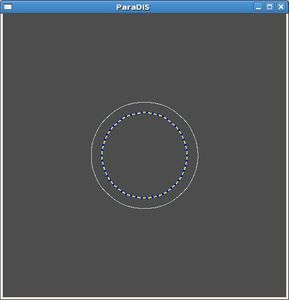
Fig.1 ParaDiS Cylinder Codes Test Run

Visualization Window control
Hot keys to manipulate the object displayed in the X window. For example. press r and then use arrow keys to rotate the object.
YWindow: yview:
Mouse drag to rotate
Hot Keys:
F1        : display this message
Up        : rotate up
Down      : rotate down
Left      : rotate left
Right     : rotate right
PgUp      : rotate counterclockwise
PgDn      : rotate clockwise
Home      : back to initial viewpoint
Space     : stop rotate
p         : toggle pause
t         : translation
s         : scaling
d         : move projection infinity point
r         : rotation
f         : toggle pbc enableness
m         : toggle drawframe
g         : pbc glide
x         : pbc shift in x
y         : pbc shift in y
z         : pbc shift in z
w         : print window specification
F9        : output gif
F10       : output postscript
Problems and solutions
./bin/paradiscyl: error while loading shared libraries: libgsl.so.0: cannot open
shared object file: No such file or directory
Fatal: ReadControlFile: Error 2 opening file XXXX
gsl: bessel_In.c:202: ERROR: overflow
Default GSL error handler invoked.
Aborted