M05 Finite Temperature Simulation: Difference between revisions
| Line 12: | Line 12: | ||
<!--Table of Child-Links--> |
<!--Table of Child-Links--> |
||
== |
== Molecular Dynamics Simulation == |
||
In [[M01 Introduction to MD++|Manual 02]], we learned how to create a perfect BCC, FCC or DC crystal |
In [[M01 Introduction to MD++|Manual 02]], we learned how to create a perfect BCC, FCC or DC crystal |
||
by the MD++ command '''makecrystal''', by which we assigned the initial position to each of the |
by the MD++ command '''makecrystal''', by which we assigned the initial position to each of the |
||
atoms. For nonzero finite temperature simulation or molecular dynamics (MD) |
atoms. For nonzero finite temperature simulation or molecular dynamics (MD) |
||
simulation, we need to additionally give the initial velocities and set |
simulation, we need to additionally give the initial velocities and set quite a few variables such as numerical |
||
integrator, time step |
integrator, time step, total steps, atomic mass as well as other parameters that controls the simulation output. |
||
with MD++ commands and variables related with MD simulations. |
In this manual, we aim to make you feel familiar with MD++ commands and variables related with MD simulations. |
||
MD simulations can be categorized as microcanonical (NVE), canonical (NVT), |
MD simulations can be categorized as microcanonical (NVE), canonical (NVT), |
||
isoenthalpic-isobaric (NPH) |
isoenthalpic-isobaric (NPH) and constant pressure/temperature (NPT) ensemble |
||
types according to which physical quantities are expected to be constant or controlled. For |
|||
example, a system of microcanonical ensemble has the total energy (E), the system volume (V) and |
example, a system of microcanonical ensemble has the total energy (E), the system volume (V) and |
||
the number of atoms (N) to be conserved during MD simulation. Basically, you need to |
the number of atoms (N) to be conserved during MD simulation. Basically, you need to |
||
| Line 31: | Line 31: | ||
It would be a good start explaining MD simulation of NVE ensemble to understand what you do with MD simulations. |
It would be a good start explaining MD simulation of NVE ensemble to understand what you do with MD simulations. |
||
Imagine a system of N-particle gas inside of a rigid container which is well insulated that the system is isolated from the environment. |
Imagine a system of N-particle gas inside of a rigid container which is well insulated that the system is isolated from the environment. |
||
There is no heat and mass transfer through the container wall. Then you expect that the number of particles, the container volume and the total energy will not change. In MD simulations, you do not see a visible wall but you may think of a closed system with fictitious walls. |
There is no heat and mass transfer through the container wall. Then you expect that the number of particles, the container volume and the total energy will not change. In MD simulations of NVE ensemble, you do not see a visible wall but you may think of a closed system with fictitious walls. |
||
Now I give the example script ''mo_NVE.tcl'' below, written in Tcl version |
Now I give the example script ''mo_NVE.tcl'' below, written in Tcl version. You can run the script by typing |
||
from the perfect BCC molybdenum (Mo) structure. You can run the script by typing |
|||
$ bin/fs_gpp scripts/mo_NVE.tcl |
$ bin/fs_gpp scripts/mo_NVE.tcl |
||
and it first creates a perfect BCC crystal of molybdenum (Mo) with a supercell of 5[1 0 0] X 5[0 1 0] X 5[0 0 1] and then runs MD simulations using the Finnis-Sinclair (FS) potential. |
|||
<pre> |
<pre> |
||
# -*-shell-script -*- |
# -*-shell-script -*- |
||
| Line 82: | Line 82: | ||
timestep = 0.001 # (in ps) |
timestep = 0.001 # (in ps) |
||
totalsteps = 2000 |
totalsteps = 2000 |
||
# save property every 10 steps |
|||
saveprop = 1 savepropfreq = 10 |
saveprop = 1 savepropfreq = 10 |
||
savecn = 0 savecnfreq = 100 |
savecn = 0 savecnfreq = 100 |
||
writeall = 1 |
writeall = 1 DOUBLE_T = 1 |
||
randseed = 12345 srand48 #randomize random number generator |
|||
#******************************************* |
#******************************************* |
||
| Line 98: | Line 99: | ||
setup_md |
setup_md |
||
MD++ initvelocity finalcnfile = init.cn writecn |
MD++ initvelocity finalcnfile = init.cn writecn |
||
#format of thermodynamic property file |
|||
MD++ {output_fmt = "curstep EPOT KATOM Tinst"} |
MD++ {output_fmt = "curstep EPOT KATOM Tinst"} |
||
MD++ outpropfile = thermo.out openpropfile |
MD++ outpropfile = thermo.out openpropfile |
||
| Line 106: | Line 108: | ||
</pre> |
</pre> |
||
In the fuction '''setup_md { }''' in the above script, important MD++ parameters for MD simulations are assigned. First, you choose which ensemble you impose by specifying '''ensemble_type''' to be NVE, NVT, NPH or NPT. You also decide the integrator between |
In the fuction '''setup_md { }''' in the above script, important MD++ parameters for MD simulations are assigned. First, you choose which ensemble you impose by specifying '''ensemble_type''' to be '''NVE''', '''NVT''', '''NPH''' or '''NPT'''. You also decide the integrator between Gear 6-th order predictor-corrector and velocity Verlet by saying '''integrator_type = "Gear6"''' or '''integrator_type = "VVerlet"'''. The predictor-corrector integrator has higher order of accuracy but the Verlet integrator is symplectic and is believed to be resilient to the larger time step. |
||
'''atommass''' is the atomic mass in g/mol, '''timestep''' is <math>\Delta t</math> used in the integrator in the unit of picosecond, '''totalsteps''' is the total number of iterations in time integration. As long as it is guaranteed that the total energy of the system is conserved, the timestep ('''timestep''') is usually taken as big as possible. The total time step ('''totalsteps''') is typically chosen long enough for the system to reach its dynamical steady state. |
'''atommass''' is the atomic mass in g/mol, '''timestep''' is <math>\Delta t</math> used in the integrator in the unit of picosecond, '''totalsteps''' is the total number of iterations in time integration. As long as it is guaranteed that the total energy of the system is conserved, the timestep ('''timestep''') is usually taken as big as possible. The total time step ('''totalsteps''') is typically chosen long enough for the system to reach its dynamical steady state. |
||
'''T_OBJ''' is the target temperature |
The initial velocity is first assigned as random numbers but then scaled to correspond to an instantaneous temperature of '''T_OBJ'''.<ref>'''T_OBJ''' is the target temperature in NVT ensemble. However, it is used here just to generate atoms' initial velocities and that does not necessarily mean the temperature will be maintained at the specified value during the simulation because there is no temperature we control in NVE ensemble.</ref> The MD++ command '''initvelocity''' initializes the velocity to each atom randomly according to the value of '''T_OBJ'''. For random number generation, '''srand48''' is executed with an integer random seed '''randseed'''. Running the simulation again with the same '''randseed''' will give you the same result (which is good for debugging). |
||
Running the simulation again with a different '''randseed''' will give you a different initial velocity condition (which is good for collecting statistics). You may also use the MD++ command '''srand48bytime''', which will use the current time as the random seed (in this way, your simulation will always have a different initial velocity condition whenever you run it again). |
|||
If the parameter '''DOUBLE_T''' is set to be 1, the initial temperature becomes twice. You can see the effect of '''DOUBLE_T = 1''' in Fig.1. When you see the temperature plot in Fig.1, you will realize that the temperature at equilibrated state seems to be half of the initial temperature. The reason why the temperature reduces by half is followed. Since the initial atomic configuration at 0 K is the local-energy-minimum structure, part of the kinetic energy initially given is always converted to the potential energy during |
If the parameter '''DOUBLE_T''' is set to be 1, the initial temperature becomes twice. You can see the effect of '''DOUBLE_T = 1''' in Fig.1. When you see the temperature plot in Fig.1, you will realize that the temperature at equilibrated state seems to be half of the initial temperature. The reason why the temperature reduces by half is followed. Since the initial atomic configuration at 0 K is the local-energy-minimum structure, part of the kinetic energy initially given is always converted to the potential energy during MD simulation and this portion amounts to be half of the kinetic energy. |
||
{|border="0" align="center" |
{|border="0" align="center" |
||
|<math> \Delta E_{\mathrm{pot}} = \Delta E_{\mathrm{kin}} = \frac{3}{2} N k_B T</math>. |
|<math> \Delta E_{\mathrm{pot}} = \Delta E_{\mathrm{kin}} = \frac{3}{2} N k_B T</math>. |
||
| Line 124: | Line 127: | ||
The MD++ command '''run''' starts MD simulation with all these parameters. There are more parameters related with MD simulation. '''saveprop''' and '''savepropfreq''' will determine whether or not the thermodynamic properties will be written in file and how often they will be. If '''saveprop = 1''' and '''savepropfreq = 10''', the thermodynamic properties such as potential energy, kinetic energy and temperature will be dumped out at every 10 step only if the MD++ command '''openpropfile''' is executed. |
The MD++ command '''run''' starts MD simulation with all these parameters. There are more parameters related with MD simulation. '''saveprop''' and '''savepropfreq''' will determine whether or not the thermodynamic properties will be written in file and how often they will be. If '''saveprop = 1''' and '''savepropfreq = 10''', the thermodynamic properties such as potential energy, kinetic energy and temperature will be dumped out at every 10 step only if the MD++ command '''openpropfile''' is executed. |
||
The |
The content of a property file is defined by '''output_fmt'''. Accordig to the example script, each line of the property file contains current step ('''curstep'''), potential energy ('''EPOT'''), kinetic energy ('''KATOM'''), and temperature ('''Tinst'''). If we do not specify '''output_fmt''', the default array of thermodynamic data output is current step ('''curstep'''), kinetic energy ('''KATOM'''), potential energy ('''EPOT'''), pressure ('''PRESSURE'''), -<math>\sigma_{xy}</math> ('''TSTRESS_xy'''), -<math>\sigma_{yz}</math> ('''TSTRESS_yz'''), -<math>\sigma_{zx}</math> ('''TSTRESS_zx'''), '''HELM''', the extended energy('''HELMP'''), thermodynamic friction coefficient ('''zeta'''), '''dEdlambda''' and the system volume ('''OMEGA'''). Units are given as eV for energy and eV/A˚^3 for stress. <font color='blue'>The sign of the stress '''TSTRESS''' is the opposite of the conventional definition in elasticity or continuum theory, because MD++ is implemented following Virial's definition of stress.</font> |
||
The thermodynamic properties can be loaded and plotted by the external program such as Octave and Matlab. |
The thermodynamic properties can be loaded and plotted by the external program such as Octave and Matlab.<ref>A simple way to plot the total energy using gnuplot (a free software on Unix/Linux) is to run the command. |
||
plot "prop.out" u ($1):($2+$3) with line |
|||
</ref> In Fig.2, total energy per atom and temperature are plotted for the systems of two different size. The bigger system (10[100] X 10[010] X 10[001]) has eight times more atoms than the other (5[100] X 5[010] X 5[001]). Obviously, you see that the thermodynamic data in the bigger system show less fluctuation. |
|||
<gallery caption="Fig.2 Energy and Temperature fluctuation of NVE ensemble" widths="300px" heights="200px" perrow="2"> |
<gallery caption="Fig.2 Energy and Temperature fluctuation of NVE ensemble" widths="300px" heights="200px" perrow="2"> |
||
Image:Energy_fluct.jpg|(a) Energy Fluctuation in NVE ensemble. |
Image:Energy_fluct.jpg|(a) Energy Fluctuation in NVE ensemble. |
||
| Line 134: | Line 139: | ||
'''savecn''' and '''savecnfreq''' are used to determine how often the intermediate configuration will be saved as .cn file with the MD++ command '''openintercnfile''' just like '''saveprop''' and '''savepropfreq'''. You can specify names of the property file and the intermediate configuration files using MD++ parameter '''outpropfile''' and '''intercnfile''', respectively. If we do not specify them, the default file name would be '''prop.out''' and '''inter.cn'''. The expression '''zipfiles = 1''' in the 11th line will compress files such as .out and .cn. For example, the configuration file '''init.cn''' and the thermodynamic data file '''thermo.out''' will be zipped as '''init.cn.gz''' and '''thermo.out.gz''', respectively. |
'''savecn''' and '''savecnfreq''' are used to determine how often the intermediate configuration will be saved as .cn file with the MD++ command '''openintercnfile''' just like '''saveprop''' and '''savepropfreq'''. You can specify names of the property file and the intermediate configuration files using MD++ parameter '''outpropfile''' and '''intercnfile''', respectively. If we do not specify them, the default file name would be '''prop.out''' and '''inter.cn'''. The expression '''zipfiles = 1''' in the 11th line will compress files such as .out and .cn. For example, the configuration file '''init.cn''' and the thermodynamic data file '''thermo.out''' will be zipped as '''init.cn.gz''' and '''thermo.out.gz''', respectively. |
||
Calling '''writecn''' saves a configuration (.cn) file, which contains the following informations; The first line specifies the total number of atoms ('''NP'''). After that there are '''NP''' lines of data and each line has three columns in default, which correspond to the scaled coordinate (<math>s_x</math>, <math>s_y</math>, <math>s_z</math>) of one atom. And then there are three lines of data that specifies a 3 X 3 box matrix <math>\mathbf{H}</math>. The real coordinates of an atom (x, y, z ) and the scaled coordinates are related by the following |
|||
| ⚫ | |||
{|border="0" align="center" |
|||
|<math> \left( \begin{array}{c} x \\ y \\ z \end{array} \right) = \left( \begin{array}{ccc} H_{11} & H_{12} & H_{13} \\ H_{21} & H_{22} & H_{23} \\ H_{31} & H_{32} & H_{33} \end{array} \right) \left( \begin{array}{c} s_x \\ s_y \\ s_z \end{array} \right)</math>. |
|||
|} |
|||
| ⚫ | If '''writeall = 1''', additional informations are added to ''NP'' lines of data such that each line has sacaled velocities ('''_VSR[i].x''', '''_VSR[i].y''' and '''_VSR[i].z'''), individual potential energy ('''_EPOT_IND[i]'''), whether-or-not fixed ('''fixed[i]'''), topology ('''_TOPOL[i]'''), atom species ('''species[i]'''), atom groups ('''group[i]''') and images ('''image[i]''') after the scaled coordinates('''_SR[i].x''', '''_SR[i].y''' and '''_SR[i].z''' for i=1 to NP) . You can check this difference by comparing two configuration files, '''perf.cn''' and '''init.cn'''. Because '''perf.cn''' is written before setting '''writeall = 1''', it has only number of atoms, scaled coordinates of each atom and the box matrix <math>\mathbf{H}</math> while '''init.cn''' has all the informations. Alternatively, '''writevelocity = 1''' can be used, which stores only the scaled coordinates and the scale velocities. |
||
Commands and variables related with visualization in '''openwindow''' will be covered in a separate manual in detail. |
Commands and variables related with visualization in '''openwindow''' will be covered in a separate manual in detail. |
||
After the simulation (run) has finished, the '''sleep''' command allows the graphics window to stay alive for a while so that we can look at the final atomic structure. You can press ctrl-c in the terminal to exit. You can also comment out the '''sleep''' command so that MD++ quits right after finishing '''run'''. |
|||
=== Canonical(NVT) Ensemble === |
=== Canonical(NVT) Ensemble === |
||
| Line 181: | Line 194: | ||
incnfile = 300K-5X5X5.cn |
incnfile = 300K-5X5X5.cn |
||
atommass = 95.94 timestep = 0.001 |
atommass = 95.94 timestep = 0.001 |
||
readcn |
readcn eval |
||
} |
} |
||
openwindow |
openwindow |
||
| Line 189: | Line 202: | ||
MD++ {output_fmt = "curstep EPOT KATOM Tinst HELMP"} |
MD++ {output_fmt = "curstep EPOT KATOM Tinst HELMP"} |
||
MD++ outpropfile = thermo-NVT.out openpropfile |
MD++ outpropfile = thermo-NVT.out openpropfile |
||
MD++ run |
MD++ run eval |
||
#reverse velocity (to test reversibility) |
|||
| ⚫ | |||
MD++ input = -1 multiplyvelocity |
|||
#MD simulation (reverse) |
|||
MD++ run eval |
|||
| ⚫ | |||
MD++ sleep quit |
MD++ sleep quit |
||
</pre> |
</pre> |
||
| Line 198: | Line 215: | ||
Thermal coefficient vt2 is related with thermal mass Q of Nose´-Hoover thermo-stat as |
Thermal coefficient vt2 is related with thermal mass Q of Nose´-Hoover thermo-stat as |
||
'''multiplyvelocity''' multiplies the number specified by the input to all ve- |
|||
locity components of all atoms. |
|||
=== Isoenthalpic-isobaric (NPH) Ensemble === |
=== Isoenthalpic-isobaric (NPH) Ensemble === |
||
| Line 205: | Line 226: | ||
=== Isothermal-isobaric (NPT) Ensemble === |
=== Isothermal-isobaric (NPT) Ensemble === |
||
---- |
---- |
||
== Notes == |
== Notes == |
||
Revision as of 08:27, 28 February 2008
Manual 05 for MD++
MD++ Tour with Sample Scripts
Keonwook Kang and Wei Cai
[First written, [ Jan 19 ]], 2007
[Last Modified, [ Feb 25 ]], 2008
Molecular Dynamics Simulation
In Manual 02, we learned how to create a perfect BCC, FCC or DC crystal by the MD++ command makecrystal, by which we assigned the initial position to each of the atoms. For nonzero finite temperature simulation or molecular dynamics (MD) simulation, we need to additionally give the initial velocities and set quite a few variables such as numerical integrator, time step, total steps, atomic mass as well as other parameters that controls the simulation output. In this manual, we aim to make you feel familiar with MD++ commands and variables related with MD simulations. MD simulations can be categorized as microcanonical (NVE), canonical (NVT), isoenthalpic-isobaric (NPH) and constant pressure/temperature (NPT) ensemble types according to which physical quantities are expected to be constant or controlled. For example, a system of microcanonical ensemble has the total energy (E), the system volume (V) and the number of atoms (N) to be conserved during MD simulation. Basically, you need to choose a proper ensemble set for your own purpose of simulation.
Microcanonical(NVE) Ensemble
It would be a good start explaining MD simulation of NVE ensemble to understand what you do with MD simulations. Imagine a system of N-particle gas inside of a rigid container which is well insulated that the system is isolated from the environment. There is no heat and mass transfer through the container wall. Then you expect that the number of particles, the container volume and the total energy will not change. In MD simulations of NVE ensemble, you do not see a visible wall but you may think of a closed system with fictitious walls.
Now I give the example script mo_NVE.tcl below, written in Tcl version. You can run the script by typing
$ bin/fs_gpp scripts/mo_NVE.tcl
and it first creates a perfect BCC crystal of molybdenum (Mo) with a supercell of 5[1 0 0] X 5[0 1 0] X 5[0 0 1] and then runs MD simulations using the Finnis-Sinclair (FS) potential.
# -*-shell-script -*-
# run NVE MD simulation of perfect crystal of Mo.
#
#*******************************************
# Definition of procedures
#*******************************************
proc initmd { } { MD++ {
#setnolog
setoverwrite
dirname = runs/mo-example
zipfiles = 1   # zip output files
#
#--------------------------------------------
# Create Perfect Crystal
element0 = Mo
crystalstructure = body-centered-cubic
latticeconst = 3.1472           # in Angstrom for Mo
latticesize = [ 1 0 0 5
                0 1 0 5
                0 0 1 5]
}}
#------------------------------------------------------------
proc readMoPot { } { MD++ {
# Read the potential file
potfile = ~/Codes/MD++/potentials/mo_pot readpot
}}
#-------------------------------------------------------------
proc openwindow { } { MD++ {
# Plot Configuration
atomradius = 1.0 bondradius = 0.3 bondlength = 2.725
atomcolor = orange highlightcolor = purple
bondcolor = red backgroundcolor = gray70
plotfreq = 10 rotateangles = [ 0 0 0 1.25 ]
openwin alloccolors rotate saverot eval plot
}}
#--------------------------------------------
proc setup_md { } { MD++ {
#MD settings
ensemble_type = "NVE" integrator_type = "VVerlet"
T_OBJ = 300        # (in Kelvin) Desired Temperature
atommass = 95.94   # (in g/mol)
timestep = 0.001   # (in ps)
totalsteps = 2000
# save property every 10 steps
saveprop = 1 savepropfreq = 10
savecn = 0   savecnfreq = 100
writeall = 1 DOUBLE_T = 1
randseed = 12345 srand48 #randomize random number generator

#*******************************************
# Main program starts here
#*******************************************
initmd
readMoPot
MD++ makecrystal finalcnfile = perf.cn writecn
openwindow
#---------------------------------------------
# run MD
setup_md
MD++ initvelocity finalcnfile = init.cn writecn
#format of thermodynamic property file
MD++ {output_fmt = "curstep EPOT KATOM Tinst"}
MD++ outpropfile = thermo.out openpropfile
MD++ run closepropfile
MD++ finalcnfile = 300K-5X5X5.cn writecn eval
MD++ sleep quit
}}
In the fuction setup_md { } in the above script, important MD++ parameters for MD simulations are assigned. First, you choose which ensemble you impose by specifying ensemble_type to be NVE, NVT, NPH or NPT. You also decide the integrator between Gear 6-th order predictor-corrector and velocity Verlet by saying integrator_type = "Gear6" or integrator_type = "VVerlet". The predictor-corrector integrator has higher order of accuracy but the Verlet integrator is symplectic and is believed to be resilient to the larger time step.
atommass is the atomic mass in g/mol, timestep is used in the integrator in the unit of picosecond, totalsteps is the total number of iterations in time integration. As long as it is guaranteed that the total energy of the system is conserved, the timestep (timestep) is usually taken as big as possible. The total time step (totalsteps) is typically chosen long enough for the system to reach its dynamical steady state.

The initial velocity is first assigned as random numbers but then scaled to correspond to an instantaneous temperature of T_OBJ.[1] The MD++ command initvelocity initializes the velocity to each atom randomly according to the value of T_OBJ. For random number generation, srand48 is executed with an integer random seed randseed. Running the simulation again with the same randseed will give you the same result (which is good for debugging). Running the simulation again with a different randseed will give you a different initial velocity condition (which is good for collecting statistics). You may also use the MD++ command srand48bytime, which will use the current time as the random seed (in this way, your simulation will always have a different initial velocity condition whenever you run it again).
If the parameter DOUBLE_T is set to be 1, the initial temperature becomes twice. You can see the effect of DOUBLE_T = 1 in Fig.1. When you see the temperature plot in Fig.1, you will realize that the temperature at equilibrated state seems to be half of the initial temperature. The reason why the temperature reduces by half is followed. Since the initial atomic configuration at 0 K is the local-energy-minimum structure, part of the kinetic energy initially given is always converted to the potential energy during MD simulation and this portion amounts to be half of the kinetic energy.
| . |

for 3D case due to the equipartition theorem.
- Fig.1 The effect of DOUBLE_T
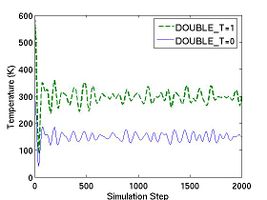
Temperature in NVE ensemble with different DOUBLE_T setting

The MD++ command run starts MD simulation with all these parameters. There are more parameters related with MD simulation. saveprop and savepropfreq will determine whether or not the thermodynamic properties will be written in file and how often they will be. If saveprop = 1 and savepropfreq = 10, the thermodynamic properties such as potential energy, kinetic energy and temperature will be dumped out at every 10 step only if the MD++ command openpropfile is executed.
The content of a property file is defined by output_fmt. Accordig to the example script, each line of the property file contains current step (curstep), potential energy (EPOT), kinetic energy (KATOM), and temperature (Tinst). If we do not specify output_fmt, the default array of thermodynamic data output is current step (curstep), kinetic energy (KATOM), potential energy (EPOT), pressure (PRESSURE), - (TSTRESS_xy), -Failed to parse (SVG (MathML can be enabled via browser plugin): Invalid response ("Math extension cannot connect to Restbase.") from server "https://wikimedia.org/api/rest_v1/":): {\displaystyle \sigma_{yz}} (TSTRESS_yz), -Failed to parse (SVG (MathML can be enabled via browser plugin): Invalid response ("Math extension cannot connect to Restbase.") from server "https://wikimedia.org/api/rest_v1/":): {\displaystyle \sigma_{zx}} (TSTRESS_zx), HELM, the extended energy(HELMP), thermodynamic friction coefficient (zeta), dEdlambda and the system volume (OMEGA). Units are given as eV for energy and eV/A˚^3 for stress. The sign of the stress TSTRESS is the opposite of the conventional definition in elasticity or continuum theory, because MD++ is implemented following Virial's definition of stress.

The thermodynamic properties can be loaded and plotted by the external program such as Octave and Matlab.[2] In Fig.2, total energy per atom and temperature are plotted for the systems of two different size. The bigger system (10[100] X 10[010] X 10[001]) has eight times more atoms than the other (5[100] X 5[010] X 5[001]). Obviously, you see that the thermodynamic data in the bigger system show less fluctuation.
- Fig.2 Energy and Temperature fluctuation of NVE ensemble
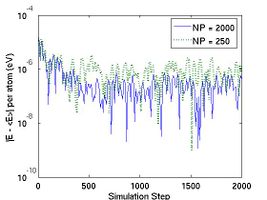
(a) Energy Fluctuation in NVE ensemble.
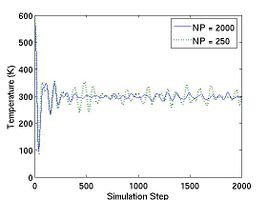
(b) Temperature in NVE ensemble


savecn and savecnfreq are used to determine how often the intermediate configuration will be saved as .cn file with the MD++ command openintercnfile just like saveprop and savepropfreq. You can specify names of the property file and the intermediate configuration files using MD++ parameter outpropfile and intercnfile, respectively. If we do not specify them, the default file name would be prop.out and inter.cn. The expression zipfiles = 1 in the 11th line will compress files such as .out and .cn. For example, the configuration file init.cn and the thermodynamic data file thermo.out will be zipped as init.cn.gz and thermo.out.gz, respectively.
Calling writecn saves a configuration (.cn) file, which contains the following informations; The first line specifies the total number of atoms (NP). After that there are NP lines of data and each line has three columns in default, which correspond to the scaled coordinate (Failed to parse (SVG (MathML can be enabled via browser plugin): Invalid response ("Math extension cannot connect to Restbase.") from server "https://wikimedia.org/api/rest_v1/":): {\displaystyle s_x} , Failed to parse (SVG (MathML can be enabled via browser plugin): Invalid response ("Math extension cannot connect to Restbase.") from server "https://wikimedia.org/api/rest_v1/":): {\displaystyle s_y} , Failed to parse (SVG (MathML can be enabled via browser plugin): Invalid response ("Math extension cannot connect to Restbase.") from server "https://wikimedia.org/api/rest_v1/":): {\displaystyle s_z} ) of one atom. And then there are three lines of data that specifies a 3 X 3 box matrix Failed to parse (SVG (MathML can be enabled via browser plugin): Invalid response ("Math extension cannot connect to Restbase.") from server "https://wikimedia.org/api/rest_v1/":): {\displaystyle \mathbf{H}} . The real coordinates of an atom (x, y, z ) and the scaled coordinates are related by the following
| Failed to parse (SVG (MathML can be enabled via browser plugin): Invalid response ("Math extension cannot connect to Restbase.") from server "https://wikimedia.org/api/rest_v1/":): {\displaystyle \left( \begin{array}{c} x \\ y \\ z \end{array} \right) = \left( \begin{array}{ccc} H_{11} & H_{12} & H_{13} \\ H_{21} & H_{22} & H_{23} \\ H_{31} & H_{32} & H_{33} \end{array} \right) \left( \begin{array}{c} s_x \\ s_y \\ s_z \end{array} \right)} . |
If writeall = 1, additional informations are added to NP lines of data such that each line has sacaled velocities (_VSR[i].x, _VSR[i].y and _VSR[i].z), individual potential energy (_EPOT_IND[i]), whether-or-not fixed (fixed[i]), topology (_TOPOL[i]), atom species (species[i]), atom groups (group[i]) and images (image[i]) after the scaled coordinates(_SR[i].x, _SR[i].y and _SR[i].z for i=1 to NP) . You can check this difference by comparing two configuration files, perf.cn and init.cn. Because perf.cn is written before setting writeall = 1, it has only number of atoms, scaled coordinates of each atom and the box matrix Failed to parse (SVG (MathML can be enabled via browser plugin): Invalid response ("Math extension cannot connect to Restbase.") from server "https://wikimedia.org/api/rest_v1/":): {\displaystyle \mathbf{H}} while init.cn has all the informations. Alternatively, writevelocity = 1 can be used, which stores only the scaled coordinates and the scale velocities.
Commands and variables related with visualization in openwindow will be covered in a separate manual in detail.
After the simulation (run) has finished, the sleep command allows the graphics window to stay alive for a while so that we can look at the final atomic structure. You can press ctrl-c in the terminal to exit. You can also comment out the sleep command so that MD++ quits right after finishing run.
Canonical(NVT) Ensemble
In the following example script mo_NVT.tcl, BCC molybdenum (Mo) will be simulated at 300 K using Nose-Hoover thermostat[3]. Run the script by typing
$ bin/fs_gpp scripts/mo_NVT.tcl
# -*-shell-script -*-
# run NVT MD simulation of perfect crystal of Mo.
#
#*******************************************
# Definition of procedures
#*******************************************
proc initmd { } {
         ...
}
#------------------------------------------------------------
proc readMoPot { } {
         ...
}
#-------------------------------------------------------------
proc openwindow { } {
         ...
}
#--------------------------------------------
proc setup_md { } { MD++ {
#MD settings
ensemble_type = "NVT" integrator_type = "VVerlet"
implementation_type = 0 vt2 = 1e28
T_OBJ = 300       # (in Kelvin) Desired Temperature
atommass = 95.94  # (g/mol)
timestep = 0.001 # (ps)
totalsteps = 2000
saveprop = 1 savepropfreq = 10
savecn = 0 savecnfreq = 100
writeall = 1
}}
#*******************************************
# Main program starts here
#*******************************************
initmd
readMoPot
MD++ {
  incnfile = 300K-5X5X5.cn
  atommass = 95.94 timestep = 0.001
  readcn eval
}
openwindow
#---------------------------------------------
# run MD
setup_md
MD++ {output_fmt = "curstep EPOT KATOM Tinst HELMP"}
MD++ outpropfile = thermo-NVT.out openpropfile
MD++ run eval
#reverse velocity (to test reversibility)
MD++ input = -1 multiplyvelocity
#MD simulation (reverse)
MD++ run eval
MD++ finalcnfile = 300K-5X5X5-NVT.cn writecn
MD++ sleep quit
Instead of creating BCC Mo crystal, this script reads the configuration file 300K_5X5X5.cn, which was generated by the previous script mo_NVE.tcl, using the MD++ command readcn. Note that when you read the configuration file, the timestep should be same with that of the previous run because the scaled velocity is stored as dimensionless unit with the timestep multiplied. It is safe that you specify timestep and atommass when reading .cn file as shown in the script.
Setting ensemble_type = "NVT" activates Nose-Hoover thermostat. In MD++, there are three different implementations of NVT integrator defined through implementation_type. If it is zero, the implicit integrator will be chosen. If it is one, the explicit integrator based on Sto¨rmer-Verlet method will work. If it is two, another explicit integrator based on Liouville formulation will be activated.
Thermal coefficient vt2 is related with thermal mass Q of Nose´-Hoover thermo-stat as
multiplyvelocity multiplies the number specified by the input to all ve- locity components of all atoms.
Isoenthalpic-isobaric (NPH) Ensemble
Isothermal-isobaric (NPT) Ensemble
Notes
- ↑ T_OBJ is the target temperature in NVT ensemble. However, it is used here just to generate atoms' initial velocities and that does not necessarily mean the temperature will be maintained at the specified value during the simulation because there is no temperature we control in NVE ensemble.
- ↑ A simple way to plot the total energy using gnuplot (a free software on Unix/Linux) is to run the command. plot "prop.out" u ($1):($2+$3) with line
- ↑ S. Nose, “A Molecular Dynamics Method for Simulations in the Canonical Ensemble”, Molecular Physics, 52 255 (1984)